Category: Thoughts

  • A more peaceful rant about Java & Camel

    I did it. I feel like I survived something, like I am on the path on enlightenment (and it feels like raising the foot for the first step in a yourney which I know to be several AEs long). Anyway, I’m kinda happy.

    What did I do? I succeeded to write this Java code using the Apache Camel library (and yes, that’s it – in total):

    import org.apache.camel.main.Main;
    
    public final class CamelPusher {
    
        private CamelPusher() {
        }
    
        public static void main(String[] args) throws Exception {
            Main camelMain = new Main();
            // https://is.gd/P8SzKX
            camelMain.configure().withXmlRoutes("file:*.xml");
            camelMain.run(args);
        }
    
    }
    

    Impresive, huh?

    What took me longest was to add the “file:” in the line camelMain.configure().withXmlRoutes("file:*.xml");. Yup, really.

    Code-wise, that is. It took me even longer to set this up:

    <?xml version="1.0" encoding="UTF-8"?>
    <project xmlns="http://maven.apache.org/POM/4.0.0"
      xmlns:xsi="http://www.w3.org/2001/XMLSchema-instance" xsi:schemaLocation="http://maven.apache.org/POM/4.0.0 http://maven.apache.org/xsd/maven-4.0.0.xsd">
      <modelVersion>4.0.0</modelVersion>
      <groupId>de.company.business</groupId>
      <artifactId>camelocclient</artifactId>
      <version>1.0.0-SNAPSHOT</version>
      <name>CamelOCClient</name>
      <description>The thing that transfers payment files to OC</description>
    
      <properties>
        <maven.compiler.source>1.8</maven.compiler.source>
        <maven.compiler.target>1.8</maven.compiler.target>
      </properties>
    
      <repositories>
        <repository>
          <id>spring-releases</id>
          <url>https://repo.spring.io/libs-release</url>
        </repository>
      </repositories>
      <pluginRepositories>
        <pluginRepository>
          <id>spring-releases</id>
          <url>https://repo.spring.io/libs-release</url>
        </pluginRepository>
      </pluginRepositories>
    
      <dependencies>
        <!-- https://mvnrepository.com/artifact/org.springframework/spring-context -->
        <dependency>
          <groupId>org.springframework</groupId>
          <artifactId>spring-context</artifactId>
          <version>5.2.5.RELEASE</version>
        </dependency>
    
        <dependency>
          <groupId>org.apache.camel</groupId>
          <artifactId>camel-core</artifactId>
          <version>3.2.0</version>
        </dependency>
    
        <dependency>
          <groupId>org.apache.camel</groupId>
          <artifactId>camel-ftp</artifactId>
          <version>3.2.0</version>
        </dependency>
    
        <!-- https://mvnrepository.com/artifact/org.apache.camel/camel-spring -->
        <dependency>
          <groupId>org.apache.camel</groupId>
          <artifactId>camel-spring</artifactId>
          <version>3.2.0</version>
        </dependency>
    
        <!-- https://mvnrepository.com/artifact/org.slf4j/slf4j-simple -->
        <dependency>
          <groupId>org.slf4j</groupId>
          <artifactId>slf4j-simple</artifactId>
          <version>1.7.30</version>
        </dependency>
    
      </dependencies>
    
      <build>
        <plugins>
          <plugin>
            <groupId>org.codehaus.mojo</groupId>
            <artifactId>versions-maven-plugin</artifactId>
            <version>2.7</version>
            <configuration>
              <allowMajorUpdates>false</allowMajorUpdates>
              <!-- https://stackoverflow.com/a/22174801/902327 -->
              <!-- fucking maven shit honestly those java assholes suck so badly -->
              <rulesUri>file:///${project.basedir}/pom-versions-ruleset.xml</rulesUri>
            </configuration>
          </plugin>
          <plugin>
            <!-- see here: https://is.gd/HNFI0H -->
            <groupId>org.springframework.boot</groupId>
            <artifactId>spring-boot-maven-plugin</artifactId>
            <version>2.1.12.RELEASE</version>
            <executions>
              <execution>
                <goals>
                  <goal>repackage</goal>
                </goals>
              </execution>
            </executions>
          </plugin>
          <plugin>
            <artifactId>exec-maven-plugin</artifactId>
            <version>1.6.0</version>
            <groupId>org.codehaus.mojo</groupId>
            <executions>
              <execution>            <!-- Run our version calculation script -->
                <id>git-tag</id>
                <goals>
                  <goal>exec</goal>
                </goals>
              </execution>
            </executions>
            <configuration>
              <executable>git</executable>
              <arguments>
                <argument>tag</argument>
                <argument>${parsedVersion.majorVersion}.${parsedVersion.minorVersion}.${parsedVersion.incrementalVersion}${parsedVersion.qualifier?}</argument>
              </arguments>
            </configuration>
          </plugin>
        </plugins>
      </build>
    
    </project>
    <!-- I FUCKING HATE MAVEN. -->
    

    And this, cause maybe I still don’t fully get maven (and with maybe I mean definitely, and yes I know there’s an error in the Makefile, I’m gonna fix it – later):

    all: clean build prepare-test test
    .PHONY: all
    
    clean:
        rm -rf tmp
    .PHONY: clean
    
    build:
        mvn package
    .PHONY: build
    
    prepare-test: clean
        mkdir -p tmp/from_here tmp/to_here tmp/and_from_here tmp/to_here_as_well
        echo deeply > tmp/from_here/i-want-to-be-moved.txt
        echo deeply > tmp/and_from_here/hashtag-metoo.txt
        cp target/camelocclient-SNAPSHOT.jar tmp/
        cp test-config.xml tmp/
    .PHONY: test
    
    test:
        cd tmp; pwd; java -cp . -jar camelocclient-SNAPSHOT.jar
    .PHONY: test
    
    run: test
    .PHONY: run
    
    .PHONY: _git_dirtycheck
    _git_dirtycheck:
        [[ ! -z "git status -s" ]] || (echo -e "\n\n***** working dir is dirty. *****\n\n" && false)
    
    .PHONY: _major
    _major: _git_dirtycheck
        mvn build-helper:parse-version \
            versions:set \
            -DnewVersion=\$${parsedVersion.nextMajorVersion}.0.0 \
            versions:commit
    
    .PHONY: _minor
    _minor: _git_dirtycheck
        mvn build-helper:parse-version \
            versions:set \
            -DnewVersion=\$${parsedVersion.majorVersion}.\$${parsedVersion.nextMinorVersion}.0 \
            versions:commit
    
    .PHONY: _patch
    _patch: _git_dirtycheck
        mvn build-helper:parse-version \
            versions:set \
            -DnewVersion=\$${parsedVersion.majorVersion}.\$${parsedVersion.minorVersion}.\$${parsedVersion.nextIncrementalVersion} \
            versions:commit
    
    .PHONY: _set_version
    _set_version: _git_dirtycheck
        read -p "new version: " VERSION ; \
        mvn build-helper:parse-version \
            versions:set \
            -DnewVersion=$$VERSION \
            versions:commit
    
    .PHONY: _snap
    _snap: _git_dirtycheck
        mvn build-helper:parse-version \
            versions:set \
            -DnewVersion=\$${parsedVersion.majorVersion}.\$${parsedVersion.minorVersion}.\$${parsedVersion.nextIncrementalVersion}-SNAPSHOT \
            versions:commit
    
    .PHONY: _tag
    _tag:
        git commit -am "Version bump"
        mvn build-helper:parse-version exec:exec
    
    .PHONY: _snap_tag
    _snap_tag: _snap _tag
    
    .PHONY: _addsnap
    _addsnap:
        mvn build-helper:parse-version \
            versions:set \
            -DnewVersion=\$${parsedVersion.majorVersion}.\$${parsedVersion.minorVersion}.\$${parsedVersion.incrementalVersion}-SNAPSHOT \
            versions:commit
    
    .PHONY: _release
    _release: _git_dirtycheck
        mvn build-helper:parse-version \
            versions:set \
            -DnewVersion=\$${parsedVersion.majorVersion}.\$${parsedVersion.minorVersion}.\$${parsedVersion.incrementalVersion} \
            versions:commit
    
    .PHONY: major
    major: _major _tag build _snap_tag
    
    .PHONY: minor
    minor: _minor _tag build _snap_tag
    
    .PHONY: patch
    patch: _patch _tag build _snap_tag
    
    .PHONY: addsnap
    addsnap: _addsnap
    
    .PHONY: rel
    rel: _release _tag build _snap_tag
    
    .PHONY: release
    release: rel
    
    .PHONY: set-version
    set-version: _set_version _tag build _snap_tag
    
    .PHONY: setver
    setver: set-version
    

    So this is it. That abomination took me days to build.

    So now I can do “make release“, get a .jar file, and place something like this next to it:

    <?xml version="1.0" encoding="UTF-8"?>
    <!--
      DOKUMENTATION:
      https://camel.apache.org/manual/latest/spring.html
    -->
    
    <routes xmlns="http://camel.apache.org/schema/spring">
        <route>
            <from uri="file:from_here"/>
            <to uri="file:to_here"/>
        </route>
        <route>
            <from uri="file:and_from_here"/>
            <to uri="file:to_here_as_well"/>
        </route>
    </routes>
    

    … having a freely configurable, all-purpose, no-nonsense Camel engine to my disposal, which I can then deploy to any host of my liking to do things which are useful. In that case – it’s supposed to transfer files (the “left” side of the system, a couple of deployments) to S3, and then pull them out (the “right” side of it, one deployment) into a folder on a target machine.

    This is it, this is all, this is basically the most trivial use case ever invented, and it’s supposed to be replaced with something “real”. Let’s see how long it takes to get there.

    Now, am I happy? Yes. Is this … “good”? No. Does it work? Probably (it does with a file server / sftp transfer system).

    But the best part is: I kinda, sorta understand a little bit of what I did. And I am starting to think that Camel might actually be awesome, and maven actually useful – once you start understanding the concepts and ecosystem. But that’s just a vague possibility, given that I still don’t 😉 .

    I published the files here as well.
  • A big fucking rant about Java

    Well, I’m back to writing Java. It was supposed to be simple – an Apache Camel .jar file which just reads the route definitions from a nearby *.XML file in the same directory. So it can be re-used, because we have a couple of dead simple use cases which just require a Camel runtime and no special Java Beans.

    Simple, right.

    I’m playing Doom Eternal for fun at the moment. And just thinking of this abomination called “maven”, which Java uses to build shit makes me wish for all maven devs to rot in hell eternally. This piece of junk is basically undocumented. Don’t get me wrong, theres tons of written stuff, intros, tutorials, etc. about maven. It’s just after reading all of them you’re still the same code-copy-pasting monkey you were before. Once you hunted down the snippet on Stackoverflow you go on to the next blackbox.

    Examples? Sure.

    • Versions in build plugins. Maven complains, but countless examples I found don’t use any version. (A Java illness, it seems all examples have to be incomplete, otherwise it’s no fun for the developer, right?).
    • Complexity. You can configure the versions-maven-plugin to update the version numbers. To ignore alpha / beta / whatever versions you have to write a regex expression in a separate file and import that to the pom.xml. Of course you write the import statement in the configuration section of the plugin. Writing the rules in there? Naaaaah, too easy my friend. Extra file please.
    • Commands. There’s no help. There’s only “plugins”. No starting point, no idea what’s “default” and what the 1, 2, 3 steps are to get your app built. Just a bunch of horseshit you try out until your app is built. Or you think it is. (Or back to Stackoverflow, take the first example that works and go on to the next blackbox …)
    • Reposities. It seems I built my app several times correctly, then I configured some repositories, and suddenly it was built … more correctly. Don’t ask me why.

    Let’s continue with Spring. They once were (and probably still are) on the forefront of “modern”, modularized, reusable, enterprise-pattern-enabled, lightweight Java. Problem is, that’s still way too complex for any sane human being.

    Examples? Sure.

    • Configuration. I try to use Apache Camel. Seems to be a great product, all is configurable using either Spring DSL or code. Now if you want to do it with Spring, until today I invested days to find out how to read the fucking configuration from that god-damned configuration file. It’s just. Not. Possible. Sure, countless examples on the net, but that leads me to …
    • the documentation. Just some random notes:
    • The examples there are just don’t cut it and come basically without any documentation.
    • All links which sound like they could help lead to a 404 page.
    • “if you want to do X you can ‘easily’ do this using Spring XML” is a sentence I want to burn now, because … well, there’s no example, usually. You’re just being redirected to some Spring page which explains the Spring concepts in epic detail, with no connection whatsoever to the actual problem with the actual fucking library.
    • If they include a code snippet it’s always without any context. So you have the critical 3 lines, but if you want to include them into an actual application, you wonder about imports, namespaces, setup boilerplates, and countless other things every. Single. Time.
    • In summary it seems the docs are there for the pros who want to just quickly look something up they inconveniently forgot cause they already know a shit ton of shit. If you’re new to this? Yeah, go ahead, it’s easy, here’s a link to the Spring concepts.
    • Oh yeah, and it might be it’s just plainly, utterly, horribly wrong. But Java being nothing but enterprise, it’s at lease consistently wrong all the time.

    I think I managed to solve the problem just now. Unfortunately this cost me days, and only because of the most brainwashed, brainfucked eco-system I can imagine.

    (Disclaimer: I think Java has some really cool parts as well, just right now – I honestly don’t care. At all.)

  • The state of things – management

    Yep, this is the challenge why I converted from a freelancer (which I still prefer as a working model) to a “normal” employed person. I am a “manager” now. Well, I just have team responsibility. And it is crazy. This brings *so* many challenges which are so amazing (cause they’re new) and exhausting (cause I need to deal with them in a completely different way).

    Here they are.

    Challenge one – team spirit. That is something I am most happy with, because our spirit is pretty high I think. And I take this on me, shamelessly, but this is also something which is deeply connected to my “leading persona”, whatever that is. And I think this one is far from perfect.

    Challenge two – training the team. I think I know some stuff, and I keep in contact with things. And I want to learn new things. Now I have to deal with maintenance shit all day, and yet want to try out new toys and stuff. This is quite complicated: On the technical side I have to think now about a way in which people can learn the most, while making sure a fuckup can not break everything. (Which it did – once, and badly). Also I have to ensure that people learn, and have fun doing it. Which is surprisingly hard, but also surprisingly cool if you see it actually working.

    Challenge three – employee interviews. I suck at it, period. I started to ask technical questions now, because before I was under the assumption that every applicant can do the job, and it’s just about how he fits in. Bad mistake. Now I learn that personal markers are also important. Which is the next thing that I need in the team, personality-wise? And am I sure of this? And does the next candidate have it? Cra-zy.

    Challenge four – managing the big picure. Or simply put – how do I make sure that the team is always up-to-date on priorities, talk to people enough, and has a good sense of when something should be “done”? And a good sense of driving it there, btw. Which is pretty much the same as

    challenge five – processes. Which process do we choose? We tried SCRUM, didn’t really work that well, so we changed it after a couple of iterations. Now we try (some sort of) Kanban, and already I am seeing transparency risks, and I need metrics. Also you often read that Kanban needs analogue ticket boards (paper, wall) – not some fancy JIRA tooling shit or so. Now what if the company policy is “log your time in tickets”? And, even most important – how do I self-manage? And the team with it? And prioritize features if they hit me like “oh in two weeks this must be done, and sorry this came in just today”?

    For me all of this is hard. I guess I am getting there, but it is a great challenge, and I love it. But soon I will need a break. And I hope some stuff is done by then.

    Update 2017-04-14: changed challenges 1&2 a bit.

  • The state of things – technology

    It’s been a while. I am currently pretty burned out, and the work keeps getting more. This is bad. But let’s talk about some challenges right now. So this is an overview of our …

    Technical state

    We’re still using Rancher. Rancher is super cool, but has the annoying habit of completely crashing about once every two months, leading to a full cluster outage for anything between 1-3 hours. Usually about 2. I still love it, but we matured in our needs, and maybe Rancher needs time to catch up (cause our needs are sometimes a bit “special”). But the Rancher team is making great progress in the right directions, and I am fully competent that Rancher will take a place in the orchestration space. Still we’re thinking about moving to K8s, simply because so much is already there.

    We’re using Prometheus for monitoring now. Rocks. Period.

    We’re still using AWS. Many of our customers would prefer Azure Germany. If you didn’t know – Azure in Germany advertises a “Data Custodian” mode, or “Data Trustee” model, not sure how to translate this and too lazy to look it up. This means that in Germany the data centers are running the true Azure stuff, but they are actually fully operated by Deutsche Telekom.

    Advantage, you ask? Easy. When the DOJ sends one of those super secure letters to Microsoft for “give me your data”, they simply forward this to Deutsche Telekom. They will probably frame it on a wall somewhere, but I don’t think they will actually give out the data. Problem solved. (We all hope :))

    We are almost done with setting the whole cloud up using Terraform. It became a really mature project over the last year, and we are super happy with the progress it’s making. Also, with Azure in the works for us (some cusomers …) this is a cool way to just manage all with the same tooling. Infrastructure as code, eh.

    We try to migrate away from Teamcity to Jenkins. We didn’t succeed yet. Too little manpower.

    But the more interesting thing is in the next post, for me at least 😉

  • The year of the … Applications.

    Es gibt ein paar Dinge ohne die ich nicht mehr so richtig leben möchte: Text expander, clipboard history, intuitiver Editor (ViM und emacs zählen nicht), und ein paar andere hätte ich gerne. Und hier ist des Linux größtes Plus des Linux größter Fluch: Die Flexibilität. Ein paar recht Gnome-lastige Eindrücke:

    Text expander: Hier tut AutoKey einen guten Job. Verwendet Python als Skriptsprache für “fancy stuff”, schon ziemlich gut. Leider führt ein fehlerhaftes Skript zu einem Einfrieren der Applikation, weniger praktisch. Außerdem werden die Tastaturkürzel nicht nach der Zuweisung aktiv – sondern erst nachdem man in der tabellarischen Übersicht auf die “Abbr” (Abbreviation) Spalte der richtigen Zeile klickt, denn dann erst “erscheint” der Kürzel dort, und dann erst ist er aktiv. Muss wohl ein Bug sein. Dennoch – klar der funktionale Favorit der Liste hier.

    Clipboard manager: Gibts. Aber nicht von Gnome, nur “normales” Gtk+ Programm. Nimmt aber bei weitem nicht alle Tastaturkombis an (ich bin z.B. CTRL-Ö gewohnt, keine Chance). Bedienung: naja. Führt dazu dass ich ihn nicht nutze, und daher recht angepisst bin.

    Chat app: Gnome hat Empathy. Dies kann jedoch kein OTR (off-the-record messaging, Verschlüsselung für Chats). Nicht weiter schlimm, gäbe es nicht ein Ticket aus 2008 und gestartete Open-Source-Bemühungen. Die FAQ dazu trocken: “Man ist der Meinung” dass Lösungen wie OTR nicht wirklich zielführend sind, da das Protokoll Verschlüsselung inhärent unterstützen sollte. Das wolle man dann unterstützen (also XMPP mit Jingle, nichts anderes). Außerdem: Da Empathy auf Telepathy beruht müsste zuerst die Telepathy lib erweitert werden, “wir sind nicht zustädig” kommt da rüber. Da ich das aus Prinzip möchte nutze ich Pidgin, dessen Integration in Gnome … “ok” ist. Dafür wesentlich schöner zu bedienen mit einer eigenen Menüleiste, und sinnvollen Menüs.

    Editor. Wir alle kennen Notepad++, ViM und emacs. Meine emacs-Zeiten sind lange vorbei (schade irgendwie, aber so isses halt), daher finde ich die beiden letzteren einfach befremdlich – zu viel mehr als “:wq” in ViM oder CTRL-X CTRL-C in emacs reichts nicht mehr. Dafür ist unter Windows Notepad++ sehr gut für produktives Arbeiten geeignet. Für Gnome: Gedit. Und das ist vergleichbar mit Notepad. Ohne “++”. Eine vollkommen sinnfreie app. Glücklicherweise gibts Sublime Text für Linux (danke, danke, danke!).

    Allgemein sind die Ecken sehr, sehr rund:

    • Notifications. Die Gnome-Notifications sind zwar nett, aber das kleine “x” oben rechts reagiert bei mir zumindest immer erst auf den zweiten Klick.
    • Fonts. Warum hat Freetype nicht von vorneherein Ubuntu-Patches installiert? Das ist ein kaum zu beschreibender Unterschied. Nicht legal?
    • Keyboard-Shortcuts: Manchmal konfigurierbar, manchmal nicht, manche per Textdatei, manche GUI. Manchmal kann man sie zuweisen, funktionieren aber nicht. Manchmal ist eine Vorauswahl in Modifier-Keys oder insgesamt in Shortcuts getroffen.
    • Wenn KDE nun mal die bessere Applikation für etwas hat, dann sieht das aus wie Java Swing unter Windows: Fremd. Genauso umgekehrt.
    • Bookmarks in Nautilus kann man nur durch CTRL-D oder einen Klick auf das “Optionen”-Zahnrad (da?!?) setzen. Nicht per drag-and-drop, und nicht über das rechts-Klick-Menü, was beides ca. 100x intuitiver wäre.
    • Die Zuweisung von Dateiendungen zu Programmen funktioniert irgendwie … nicht.
    • Den Hauptbildschirm in den Display-Einstellungen festzulegen ist sehr unintuitiv (man ziehe den winzigen schwarzen Balken von einem Monitor auf den anderen – wenn man das weiß total einfach, ansonsten eher unintuitiv)

    Und demnächst muss ich einfach mal einen positiven Post schreiben, schließlich arbeite ich mit dem System, und das auch noch gerne …

  • The year of … the Printer.

    Ah, ich bin langsam – der Post schimmelt schon eine Weile hier vor sich hin, weil ich den Screenshot hochlade. Jetzt isses soweit. Es geht also weiter mit: Drucken. Denn irgendwann lief das System schließlich, und ich kam an den Punkt, an dem ich etwas drucken wollte. Gnome war installiert, Firefox auch, also theoretisch (kenne ich ja vom Mac, da verrichtet CUPS ja auch hervorragende Dienste) einfach die WebGui aufrufen, Drucker auswählen, fertig.

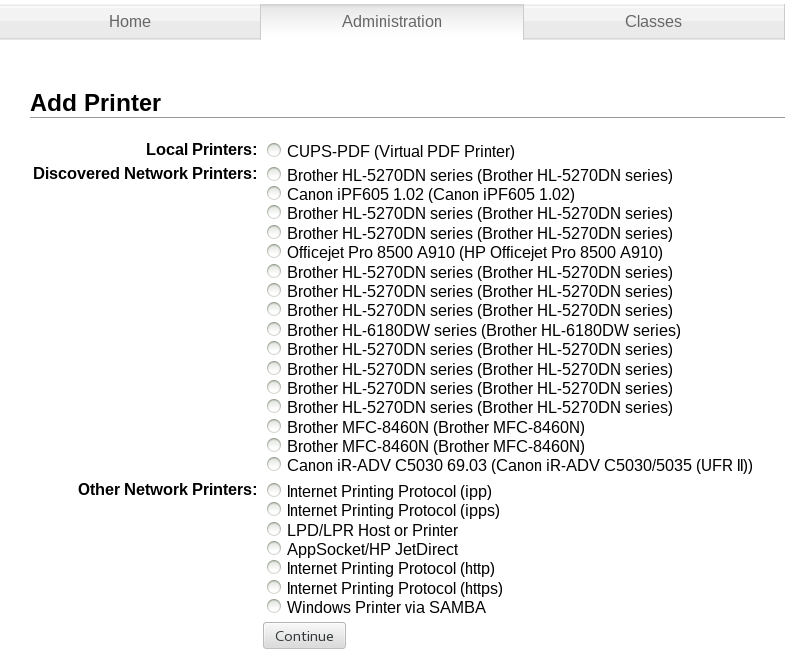
    Zuallererst musste ich an Linus denken: root-Passwort-Eingabe für die Administration von CUPS nötig. Hm. Egal, eingegeben, dann “Add Printer” geklickt, und erst mal erfreut folgendes gesehen:

    add printer dialog

    Hm. Sieht erst mal gut aus, oder? Na, jedenfalls bis man sich die Frage stellt: Welcher der Drucker ist jetzt genau der hier im Büro? Nur Typenbezeichnungen, kein Standort, keine IP? Nicht optimal.

    Der Einfachheit halber einfach manuell installieren. IP vom Kollegen erfragt, und los. Und stop. Drucker URL eingeben … nur wie? Mit “http://”? Oder “lpd://”? Oder “ipp://”? Und hier dann mit oder ohne “/ipp” am Ende? Ich entschied mich für “ipp://” ohne “/ipp”. Dann bitte “Make and Model” auswählen, Brother war nicht in der Liste, Ende.

    Aber kein Problem, Brother gibt ja eigens Linux-Treiber raus. Nur nicht auf der “normalen” Brother-Downloads-Seite, die hat nur Mac und Windows-Treiber. Hm. Ich bin faul, also mal die Variante versucht, die früher mal ging: Zurück, HP Drucker ausgewählt, PCL6, Testseite gedruckt, klappt … nicht. Na gut, wäre auch nicht schön gewesen, aber trotzdem.

    Nochmal zurück, Drucker gelöscht. Dann Google bemüht, die “richtige normale” Brother-Homepage für den Linux-Support gefunden (wäre unter Support -> Linux gewesen, und nicht Support -> Downloads, aber ehrlich, wer schaut noch den Rest der Seite an wenn er das Bild unten sieht? Ich jedenfalls nicht).

    brother homepage download section

    Dort gibts für das von mir gesuchte Modell 5 Treiber zum herunterladen, und zwar folgende:

    • LPR driver (jeweils als rpm + deb)
    • cupswrapper driver (jeweils als rpm + deb)
    • ppd file

    Aha. Ich entschied mich für PPD, ich bin ja CUPS, ne, und nochmal von vorn: Drucker hinzufügen, manuell, URL diesmal mit “ipp://…/ipp” (also mit “/ipp” am Ende), und siehe da – jetzt kamen auch automatisch Brother-Geräte in der Liste (WTF?), wenn auch nicht das Modell hier im Büro. Daher runtergeladenes PPD eingebunden, bestätigt, Testseite gedruckt, fertig.

    Nicht so ganz optimal.

  • The year of … the Installation.

    Wie versprochen – ein klein wenig gemecker über die Linux Desktop Bemühungen. Erste Hürde: Die Installation.

    Meine Wahl fiel auf Arch Linux, das sollte gut sein, und ich wollte nicht auf den Ubuntu-Zug aufspringen. Bedingungen: Vollverschlüsselte Festplatte (incl. Swap und System), verlangt der Kunde. Ist prinzipiell gut dokumentiert, auch durch eine Howto eines Kollegen. Aber ich wollte statt LVM auf Partition mal BTRFS testen – wenn schon denn schon.

    Um es kurz zu machen – die Installation dauerte knapp 3 Tage.

    Zuerst bootete das System nicht. Grub 2 wollte partout nicht starten und hing – auch nach mehrfachem neu schreiben des Bootsektors – in einer Boot-Loop fest. Zwischendrin hatte ich Arch schon aufgegeben und es mit Ubuntu 13.04 versucht – nur auch hier startete Grub nicht durch, sondern hing einfach. Schließlich gelang mir ein Systemstart nach einem vollständigen Überschreiben der ersten 50 MB der Festplatte durch /dev/random, und einer Neuinstallation von Arch vom allerersten Schritt an.

    Anschließend installierte ich Grafiktreiber, X, Gnome, aktivierte Swap in der /etc/crypttab und startete neu.

    Der Laptop startete, ich muss mein Passwort für die Festplatten-Entschlüsselung eingeben, der Bildschirm flackert, und der Rechner steht. Erste Vermutung: Grafiktreiber. Keinerlei Debug-Meldungen nirgendwo.

    Nach einer weiteren Arch Neuinstallation, da ich irgendwann einfach nicht weiter wusste, kam ich irgendwann durch Zufall und Faulheit auf den Trichter, dass es nicht die Grafik war (denn die ging dann auf einmal), sondern ein fehlerhaftes Einbinden der swap-Partition in der /etc/crypttab. Stand – wie ich im Nachhinein erfuhr – auch sehr klein im Kleingedruckten. So halb meine Schuld also, dennoch sehr, sehr schlecht zu diagnostizieren, und mit enormem Zeitverlust verbunden. Dass vergesse ich auch so schnell nicht wieder.

  • The Year Of The Linux Desktop!

    Es ist eine Ewigkeit her, seitdem ich hauptsächlich mit dem Linux-Desktop gearbeitet habe. Linux Server? Ständig. Dauernd. Immer. Aber Linux Desktop? Über 7 Jahre nicht mehr, mindestens. Und jetzt – die erste Frage in meinem aktuellen Projekt war: Was magst haben? Linux? Windows? 🙂 . Oh wie geil – Linux natürlich! Endlich konnte ich mal mit einer der aktuellen, vielgelobten, gut gereiften Linux-Distris arbeiten.

    Dennoch bin ich von der Entwicklung der letzten Jahre alles andere als begeistert. In den nächsten Posts erläutere ich anhand einiger Beispiele aus erster Hand, warum.

    Und ja, ich fange mein neues Blog mit einem klein wenig Gemecker an. Man gönnt sich ja sonst nix 🙂 . Trotz allem bin ich ein Fan, man redet schließlich nicht über Dinge, die einem egal sind.