Tag: puppet

  • Quick puppet debugging snippet for Atom

    Not sure how I could have lived without this Atom snippet expansion until now (had it before in Sublime, never bothered porting, stooooopid as I realize now 😉 ):

    '.source.puppet':
      'Puppet: fail inline template':
        'prefix': 'fit'
        'body': """
          $fail_me = inline_template('<%= require "yaml"; YAML.dump(@$1) %>')
          fail("\\\\n\\\\nVariable \\\\$$1:\\\\n\${fail_me}\\\\n\\\\n")
        """
    
  • Loathing RSpec and Puppet

    There are words for how much I hate RSpec (especially RSpec-Puppet), but they would be too harsh to write down.

    So now that I don’t have to google the same shit over and over again, here’s what you have to do to get basic puppet module testing up and running (replace $MODULE with your module name, of course):

    $MODULE/Rakefile

    require 'rubygems'
    require 'puppetlabs_spec_helper/rake_tasks'
    

    $MODULE/.fixtures.yml

    fixtures:
      repositories:
        concat:
      git://github.com/puppetlabs/puppetlabs-concat.git
      # alternate method, for specifying refs
        stdlib:
      repo: git://github.com/puppetlabs/puppetlabs-stdlib.git
      ref: 1.0.0
      symlinks:
      # do _not_ forget this
        $MODULE: "#{source_dir}"
    

    $MODULE/spec/spec_helper.rb

    require 'rubygems'
    require 'puppetlabs_spec_helper/module_spec_helper'
    

    $MODULE/spec/classes/$MODULE_spec.rb

    # see also http://rspec-puppet.com/
    require 'spec_helper'
    
    describe '$MODULE' do
      context 'default' do
        it {
          should contain_file('/etc/haproxy/haproxy.conf')
        }
    
        # or ...
        it do
          is_expected.to contain_file('/this/syntax/is/even/more/retarded')
        end
      end
    end
    

    Final note

    It’s “rake spec”, not “rake test”. Of course.

  • Host monitoring with Prometheus

    I needed monitoring. The plan was to go for an external service – if our environment breaks down, the monitoring is still functional (at least as far as the remaining environment goes). I started to evaluate sysdig cloud, which comes somewhat recommended from “the internet”.

    But then I was kinda unsatisfied (to be honest – most probably unjustified) with the service, because I really didn’t like the UI, and then one metric which was displayed was just wrong. So I got back to prometheus, which we use for metrics gathering of our running services anyway, and used it for host metric monitoring, too.

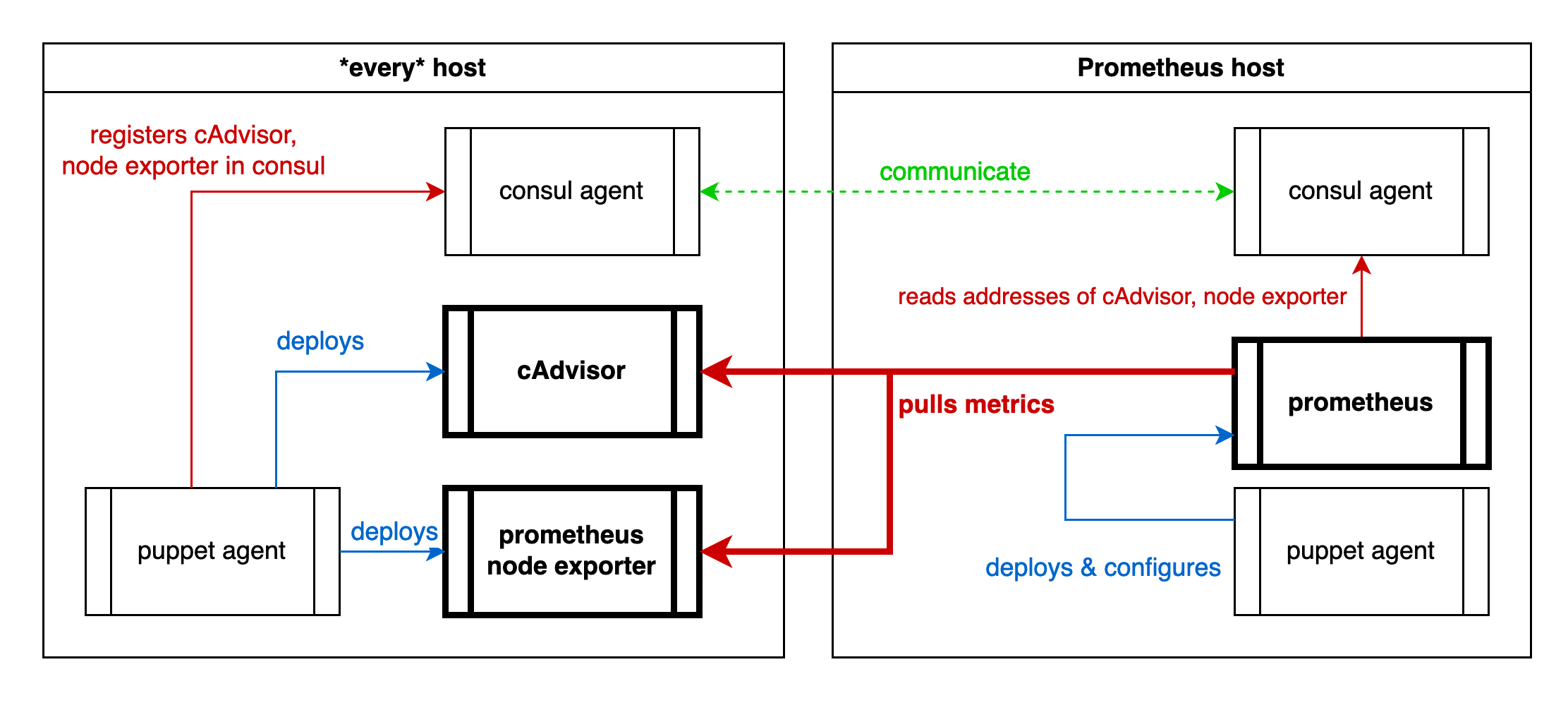
    That’s my setup. (sorry for the crappy graphic, WordPress does not support SVG … ?!?)

    monitoring setup diagram

    Cause I have consul running on every host, puppet deploying everything, I can use puppet to register the exporter services to consul, and consul to configure prometheus, which has native consul support.

    The prometheus configuration to pull all this is pretty simple actually, once it works:

    global:
      scrape_interval: 10s
      scrape_timeout: 3s
      evaluation_interval: 10s
    scrape_configs:
      - job_name: consul
        consul_sd_configs:
          - server: consul.internal.net:8500
            services: [prom-pushgateway, cadvisor, node-exporter]
        relabel_configs:
          - source_labels: ["__meta_consul_node"]
            regex: "^(.*)$"
            target_label: node
            replacement: "$1"
          - source_labels: ["__meta_consul_service"]
            regex: "^(.*)$"
            target_label: job
            replacement: "$1"
        metric_relabel_configs:
          - source_labels: ["id"]
            regex: "/([^/]+)/.*"
            target_label: item_type
            replacement: "$1"
          - source_labels: ["id"]
            regex: "/[^/]+/(.*)"
            target_label: item
            replacement: "$1"
          - source_labels: ["id"]
            regex: "/docker/(.{8}).*"
            target_label: item
            replacement: "$1"
    

    Some caveats:

    • Prometheus will not tell you why a relabeling does not work. It will just not do it.
    • Prometheus will not tell you that a regex is faulty on SIGHUP, only on restart.
    • The difference between “metric_relabel_configs” and “relabel_configs” seems to be that the former must be applied to scraped metrics, while the latter can only be applied to metrics which are “already present”, which seems to be only the “\__*”-meta labels (for example “__meta_consul_service”)

    Then it works like a charm.

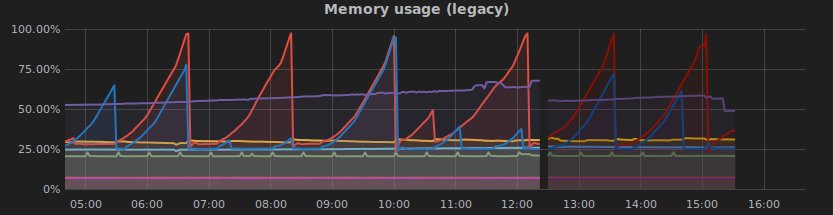
    And the final bonbon: Directly after I had it running I discovered a problem:

    grafana shows a problem

    Yippieh 😀

    consul, #monitoring, #prometheus, #puppet

  • My take at a CI infrastructure, Pt.1

    … so far.

    It might be crappy, but I’ll share it, cause it’s working. (Well, today it started doing this 😉 ). But enough preamble, let’s jump in.

    The Situation

    I am in a new project. Those people have nothing but a deadline, and when I say nothing I mean it. Not even code. They asked me what I would do, and I said “go cloud, use everything you can from other people, so you don’t have to do it, and you stay in tune with the rest of the universe” (read: avoid NIH syndrome). They agreed, and hired me.

    The Starting Point

    They really want the JetBrains toolchain, the devs use CLion. They also want YouTrack for ticketing (which doesn’t blow my mind so far, but it’s ok). Naturally they want to use TeamCity, which is the Jenkins alternative from JetBrains, and pretty all right from what I can see so far.

    The code is probably 95%+ C++, and creates a stateless REST endpoint in the cloud (but load balanced). That’s a really simple setup to start with, just perfect.

    Source code hosting was initially planned to be either inhouse or in the bought cloud, not with a hoster. Up to now they were using git, but without graphical frontend which involved manual creation (by the – part time – admin) of every git repo.

    The Cloud Environment

    That’s just practical stuff now, and has nothing – yet – to do with CI/CD. Skip it if you’re just interested in that. Read it if you want to read my brain.

    I looked around for full-stack hosted CI/CD systems, notably found only Shippable, and thought that they don’t fully match the requirements (even when we move source code hosting out). So I went to AWS, and tried ElasticBeanstalk. This is quite cool, unfortunately scaling takes about 3-5 minutes for the new host to come up (tested with my little load dummy tool in a simple setup, which I actually didn’t save, which was stupid).

    Anyway, before deploying services CI (the compilation & build stuff) must work. So my first goal was to to get something up and running ASAP, and thats bold and capitalized. Fully automated of course.

    For any kubernetes/CoreOS/… layout I lack the experience to make it available quickly, and – really – all the AWS “click here to deploy” images of those tools didn’t work out-of-the-box. So I started fairly conventional with a simple CloudFormation template spawning three hosts: TeamCity server, TeamCity agent, Docker registry, and – really important – GitLab. Since then GitLab was replaced by a paid GitHub account, all the better.

    Setting the hosts up I used Puppet (oh wonder, being a Puppet “Expert”). Most of the time went in writing a TeamCity puppet module. A quirk is that the agents must download their ZIP distribution image from a running master only, which is kinda annoying to do right in puppet. For now TeamCity is also set up conventionally (without docker), which I might change soon, at least for the server. The postgres database runs in a container, though, which is super-super simple to set up (please donate a bit if you use it, even 1€ / 1$ helps, that guy did a great job!). Same went for gitlab (same guy), and redis (again). I also used the anti-pattern of configuring the hosts based on their IP addresses.

    I also wanted to automate host bootstrapping, so I did this in the cloudformation template for each host. The archive downloaded in this script contains 3 more scripts – a distribution-dependent one which is called first, have a look to see details. Basically it’s just a way to download a snapshot of our current puppet setup (encrypted), and initialize it so puppet can take over. I also use “at” in those scripts to perform a reboot and an action after, which is highly convenient.

    CI (finally)

    … in the next post 😉
  • Puppet spec fixtures

    That’s how you specify branches in puppetlabs’ spec_helper fixtures.yml:

    fixtures:
      forge_modules:
        stdlib:
          repo: "puppetlabs/stdlib"
          ref: "4.6.0"
      symlinks:
        mapr_helpers: "#{source_dir}"
      repositories:
        mapr:
          repo: "http://myurl/puppet-mapr.git"
          # this is a branch. stolen from: don't remember.
          ref: 'remotes/origin/ab/devel'
    
  • Puppet Quiz: What’s wrong here?

    The error is: Dependency cycle.

    The code is:

    class my::own::docker {
        include ::docker
        file { '/var/lib/docker':
            ensure => directory,
            before => Class['docker'],
        }
    }
    

    Why? 🙂

    It’s rather simple here, in the real class it really took me a while to find it.

  • The limits of puppetDB a.k.a. etcd with puppet

    Okay. Maybe this is the completely wrong way to do this, but I found no other. Comments appreciated.

    Situation:

    • A DNS server cluster, meaning pacemaker managing an IP failover if one of them fails.
    • The cluster IP (the one switching over) should be the IP used for DNS lookups.

    Idea:

    • Hosts should automatically find ‘their’ DNS server using something. The DNS server should register itself somewhere so it is automatically set up during the first puppet run.

    So far, so good. Unfortunately there are a few problems with it. My first approach was something like this:

    ## THIS WILL NOT WORK
    
    # on every DNS server (*)
    @@resolv_conf_entry { $my_cluster_ip :
        tag = $domain,
    }
    
    # on every other machine:
    Resolv_conf_entry <<| tag == $domain |>>
    

    Unfortunately this will lead to a “duplicate declaration” on the client side – because all of the clustered DNS servers will export this, and the cluster_ip is identical on the DNS server hosts.

    The solution I came up with is etcd. A project from the girls and guys of CoreOS, which is basically a REST powered key-value store as trimmed down as possible, a binary about 3 MB, cluster-able, super-super-super simple to set up, and stand alone. The whole setup is like this:

    • etcd is installed on every puppet master
    • I wrote an etcd module(**) providing the methods etcd_set_value($etcd_url,$key_name,$key_value) and etcd_get_value($etcd_url,$key_name)
    • The $etcd_url is entered into hiera

    Now, we can do the following:

    # on each DNS server:
    $etcd_url = hiera('etcd_url')
    etcd_set_value( $etcd_url , "/puppet/dns_server_for/${domain}" , $my_cluster_ip )
    
    # on each other server:
    $etcd_url = hiera('etcd_url')
    $dns_server = etcd_get_value( $etcd_url , "/puppet/dns_server_for/${domain}" )
    resolv_conf_entry { $dns_server : }
    

    Works beautifully.

    Now go read the etcd docs and try to think of some other applications. etcd is a great tool (CoreOS is not too bad either, we’re evaluating it right now and are pretty amazed), and go use it. It is really much simpler than puppet.

    (*) Note that resolv_conf_entry{} is just a placeholder and does not exist (unless you write it).

    (**) I cannot – unfortunately – publish the module (yet), because the customer I wrote it for has not yet allowed me to.

  • Augeas und Reihenfolge

    Problem: mit HIlfe von Augeas einen Eintrag zur /etc/hosts Datei hinzufügen.

    Erste Lösung:

    augeas { "${title}" :
        context => '/files/etc/hosts',
        changes => [
            "rm *[canonical = '${host}']",
            "set 02/canonical ${host}",
            "set 02/ipaddr ${ip}",
        ]
    }
    

    Funktioniert nicht. Warum? Trotz Aufruf von “save” am Ende einer jeden Sitzung im augtool ist die Reihenfolge der Anweisungen durchaus entscheidend – die Daten werden offenbar nicht erst am Ende zusammengesetzt. Hier z.B. gilt: In der gleichen Reihenfolge vorgehen, wie es auch in die Datei geschrieben werden würde. Und da steht nun mal am Anfang die IP Adresse. Daher also eine einfache kleine Änderung machen und schon gehts:

    augeas { "${title}" :
        context => '/files/etc/hosts',
        changes => [
            "rm *[canonical = '${host}']",
            "set 02/ipaddr ${ip}",
            "set 02/canonical ${host}",
        ]
    }
    

    (Ganz davon abgesehen dass man einfach den host{} Typen von Puppet verwenden sollte)

  • Nervige Puppet Fehler

    Was geht hier nicht?

    class { 'whatever' :
        do     => 'something',
        before => Class[ 'something_else' ],
    } ->
    
    class { 'yeah_yeah' : do => 'even_more', }
    

    Na? Niemand? Gut. Lösung: “before =>” und “->” mischen sich nicht. Das wäre nicht so schlimm, wäre die Fehlermeldung nicht absolut … unzureichend:

    err: Could not retrieve catalog from remote server: Error 400 on SERVER: undefined method `<<' for {}:Hash on node bstrap_foreman_v2. ...
    

    Noch sowas dass man nicht mehr vergisst. Glücklicherweise gibts grafische git logs …

  • Puppet & Augeas & Pulp

    Ach Augeas ist schon genial. Wenn nur nicht … (jaja, immer was zu meckern). Anlass diesmal: /etc/pulp/admin/admin.conf. Das ist eine in Augeas nicht vorgesehene Datei, und die Augeas-Doku ist … nun ja. Analyse: Die Datei besteht aus Sektionen (“[blablubb]”), und Einträgen (“hallo = welt”). Da sollte sich doch was finden lassen.

    Tut es auch: Die IniFile-Lens. Preisfrage: Wie testet man das? Beim Ausprobieren stieß ich auch auf die Information, dass die IniFile-Lens nicht für direkte Nutzung gedacht ist, sondern nur für die Nutzung in … abgeleiteten Lenses. Wie z.B. der Puppet-Lens. Die angeblich gut passt. Dann testet man das auf der Konsole folgendermaßen:

    augtool> set /augeas/load/IniFile/lens Puppet.lns
    augtool> set /augeas/load/IniFile/incl /etc/pulp/admin/admin.conf
    augtool> load
    augtool> match /files/etc/pulp/admin/admin.conf/server/host
    /files/etc/pulp/admin/admin.conf/server/host = localhost.localdomain
    

    Schee. Total intuitiv, oder? 🙂

    Ich möchte also den Wert von “host” unter “[server]” ändern, wie man sieht. Die dafür notwendige Puppet-Regel sieht so aus:

    augeas { "admin.conf/${key}":
        incl    => '/etc/pulp/admin/admin.conf',
        lens    => 'Puppet.lns',
        onlyif  => "get /files/etc/pulp/admin/admin.conf/server/host != ${hostname}",
        changes => [
            "set /files/etc/pulp/admin/admin.conf/server/host ${hostname}",
        ],
    }
    

    So wird ein Schuh draus. Man beachte, dass in der onlyif-Abfrage vor und hinter “!=” ein Leerzeichen stehen muss.