Tag: tools

  • Hugo: index vs. _index

    I renamed ./content/about.md to ./content/index.md, and poof! … all tags gone, all blog postings gone.

    What?!

    It makes sense, if you think about it.

    index.md is a special file, which automatically marks the directory it is in as a so-called “leaf-bundle“, which then makes all the files and directories and all directories become “irrelevant” – a leaf bundle has no children.

    So, what I actually wanted to do was to rename it to _index.md, which marks ./content as what it is – a branch bundle.

    Or in short: don’t put index.md files in ./content. If you want to update your home page, use _index.md.

    Sources:

  • Fix tmux on Mac

    I started tmux. Every time i pressed <BACKSPACE> got got a … space. This felt wrong, so the internets had a solution ready.

    This is it:

    mkdir -p $HOME/.config/tmux
    echo 'set-option default-terminal "screen-256color"' > $HOME/.config/tmux/tmux.conf
    

    Apparently the Mac OS ncurses database on Mac does not contain the settings for tmux’s default value of tmux-256color, but the ones for screen.

    Sources (including some more ways to fix it):

  • VS Code keymaps in Sublime Text

    I am used to VS code keymaps now, but I keep realizing how utterly fast Sublime Text is compared to the Microsoft behemoth. So I am gradually switching over, sloooowly, for some tasks.

    A major pain was my muscle memory. Here’s the start of my solution:

    [
      { "keys": ["alt+up"], "command": "swap_line_up" },
      { "keys": ["alt+down"], "command": "swap_line_down" },
    
      { "keys": ["super+alt+up"], "command": "select_lines", "args": { "forward": false } },
      { "keys": ["super+alt+down"], "command": "select_lines", "args": { "forward": true } },
    
      { "keys": ["shift+alt+up"], "command": "duplicate_line" },
      { "keys": ["shift+alt+down"], "command": "duplicate_line" }
    ]
    

    (And yes, the final comma is actually parsed correctly by Sublime)

  • Backup tool selected

    I enacted an act of choosing. I chose restic.

    Reasons why

    Single binary. The contender with the even better stats was duplicati, which is available from the Ubuntu repositories, but requires 130+ MB of packages to be installed. This is a server system, so a single binary is just what I want – and very easy to duplicate if we switch operating systems. It also comes with a first-class-citizen web UI, which can be bad – cause once you need the backup tool you don’t want to have click orgies in web UIs to get stuff back.

    Somewhat good performace according to the comparison from the last post. I don’t expect to back up huge amounts of data, but I will keep an eye on the restore times. Also this is backing up data from a VM in a data center, so the link bandwidth should be sufficient in all directions.

    Best ever update process for a single binary. Just invoke restic self-update, and it does the rest. So cool.

    Nice docs – at least compared to, for example, duplicity.

    The remaining open question is whether it will back up all file metadata, which I will see shortly.

    Noteworthy

    Like all fiels in IT “backup” has the same drawbacks. On one side you have god-almighty-powerful tools for license cost that makes you scream while needing at least 5 certifications on top to operate them, on the other side you have … tar. Luckily, for backups you get at least some middle ground, namely all the tools I mentioned in my first post.

    I think all of them have certain advantages and disadvantages, while all being “good” tools for the job. The reasons I chose restic are above. Personally I would really like to try bupstash, but with backup software it does not pay to go for the “unstable” software which “might lose data”.

    Current state

    I have (blog post(s) with details forthcoming) …

    • created an S3 bucket and an IAM user with limited access to this
    • installed restic on one machine
    • initialized the restic repository in said bucket
    • created a run script which performs backups and handles service states
    • I want to update databases, and the safest way to do this is to stop them before
    • created a cron job which executes this script every 3 days
  • jq snippets

    Delete any object which contains a "keyname": "keyvalue" pair anywhere in the JSON:

    cat x.json| jq 'del(..|select(objects and .keyname == "keyvalue"))'
    

    If keyname contains a dash (“-“), use one of those notations:

    cat x.json | jq 'del(..|select(objects and .["key-name"] == "keyvalue"))'
    cat x.json | jq 'del(..|select(objects and ."key-name" == "keyvalue"))'
    

    Delete all objects anywhere that contain a certain key:

    cat x.json | jq 'del(..|select(objects and .key?)'
    

    Delete a certain key from all objects everywhere:

    cat x.json | jq 'del(..|.response?)'
    

    Useful sources:

  • Backup tool evaluation

    (Update 2021-10-17: Read about the final decision here)

    Because now I need backup.

    Tools considered:

    Not considered:

    • arq – Mac/Win only, not free
    • bacula – waaay to complicated, apparently no S3 support
    • bup – no s3 support
    • bupstash – self-called alpha software, no S3 support
    • clonezilla – no S3 support, only block device backups
    • duplicacy – only free for non-commercial use

    Links:

  • GOPATH and GOROOT

    go has some unique concepts, one of them is a system-wide (user-wide) central go directory where things “happen” (e.g. modules being downloaded, etc.). For example, if you perform hugo mod get you essentially perform go mod get, which then downloads required modules … into your $GOPATH. Or $GOROOT/something, I really don’t quite get it, and I don’t care unless it stops working. Which it did.

    You often read “Just look into $GOPATH and see if it’s there”. Unfortunately I never set the value so there is no environment variable. The default of $HOME/go does not exist on my mac. Now what?

    Thanks to 0x434d53 I now know to do this, which prints the values used by go:

    go env
    
  • Hugo migration experiences

    The goal was to switch to hugo as a static blogging engine. My reasons were:

    • super easy hosting (planned was S3 & CloudFront, it is now Netlify – which is insanely easy and I don’t need my homepage-builder image any longer)
    • no database any more, everything in git, including git push deployments
    • super quick page loads

    While trying this I found a couple of drawbacks, mainly …

    • way less themes than WordPress (well, big surprise), in by far not the same quality
    • theme switching is, if it gets improved a lot, still a PITA (right now let’s just not talk about it)
    • it is insanely hard to debug your page if something does not work
    • currently no comment engine

    It is a double-edged sword. During the migration process I often wished for a quick WYSIWYG “new blog post” editor like in WordPress, at the same time I loved the security git gave me – it’s nearly impossible to lose images, posts, whatever in your blog, it will always be “somewhere” in git. But there are already ways to get around that (it seems forestry.io is exactly that).

    So, here we are now. The state is:

    • currently, no comments available
    • cause I hate ads and don’t want to introduce ad-supported Disqus, and I also don’t want to pay for it
    • the plan is to add a self-hosted commenting engine though
    • all posts transferred, including all images (as far as I can tell)
    • a somewhat final theme (50:50 that this will be changed again)

    … and all of this took WAY longer that I expected.

  • Install “legacy” brew on M1 apple silicon

    I tried installing homebrew for about 3 days following the completely identical howto postings out there (i.e. “prefix with ‘arch -x86_64′”). Alas, it didn’t work:

    $ arch -x86_64 /bin/bash -c "$(curl -fsSL https://raw.githubusercontent.com/Homebrew/install/master/install.sh)"
    Password:
    Homebrew is not (yet) supported on ARM processors!
    Rerun the Homebrew installer under Rosetta 2.
    If you really know what you are doing and are prepared for a very broken
    experience you can use another installation option for installing on ARM:
      https://docs.brew.sh/Installation
    

    The other recommendation (run the whole terminal under Rosetta2, scroll down to “Running a special flavor […]”) also did not work.

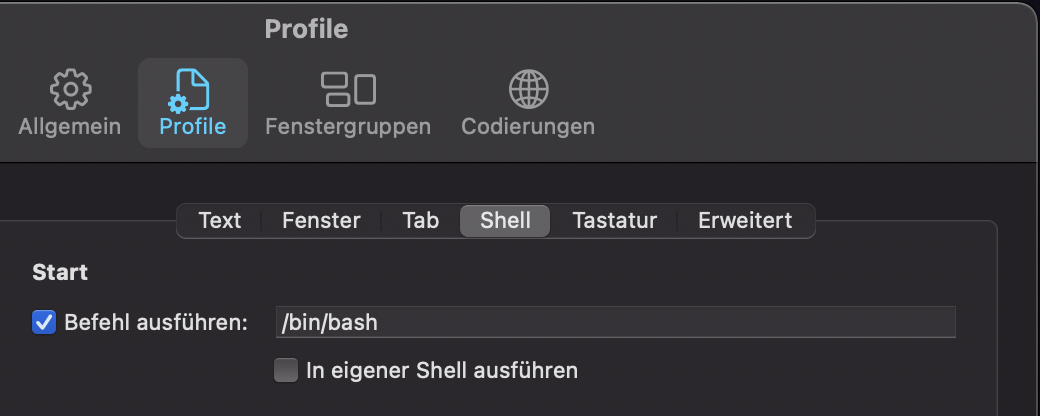
    What did finally work though was changing my login shell to /bin/bash instead of the default zsh for the time being:

    item-settings

    Maybe that helps someone.

    The “install the M1 version” process described by Noah Peters (thanks, really!) did work on the first try.

  • A more peaceful rant about Java & Camel

    I did it. I feel like I survived something, like I am on the path on enlightenment (and it feels like raising the foot for the first step in a yourney which I know to be several AEs long). Anyway, I’m kinda happy.

    What did I do? I succeeded to write this Java code using the Apache Camel library (and yes, that’s it – in total):

    import org.apache.camel.main.Main;
    
    public final class CamelPusher {
    
        private CamelPusher() {
        }
    
        public static void main(String[] args) throws Exception {
            Main camelMain = new Main();
            // https://is.gd/P8SzKX
            camelMain.configure().withXmlRoutes("file:*.xml");
            camelMain.run(args);
        }
    
    }
    

    Impresive, huh?

    What took me longest was to add the “file:” in the line camelMain.configure().withXmlRoutes("file:*.xml");. Yup, really.

    Code-wise, that is. It took me even longer to set this up:

    <?xml version="1.0" encoding="UTF-8"?>
    <project xmlns="http://maven.apache.org/POM/4.0.0"
      xmlns:xsi="http://www.w3.org/2001/XMLSchema-instance" xsi:schemaLocation="http://maven.apache.org/POM/4.0.0 http://maven.apache.org/xsd/maven-4.0.0.xsd">
      <modelVersion>4.0.0</modelVersion>
      <groupId>de.company.business</groupId>
      <artifactId>camelocclient</artifactId>
      <version>1.0.0-SNAPSHOT</version>
      <name>CamelOCClient</name>
      <description>The thing that transfers payment files to OC</description>
    
      <properties>
        <maven.compiler.source>1.8</maven.compiler.source>
        <maven.compiler.target>1.8</maven.compiler.target>
      </properties>
    
      <repositories>
        <repository>
          <id>spring-releases</id>
          <url>https://repo.spring.io/libs-release</url>
        </repository>
      </repositories>
      <pluginRepositories>
        <pluginRepository>
          <id>spring-releases</id>
          <url>https://repo.spring.io/libs-release</url>
        </pluginRepository>
      </pluginRepositories>
    
      <dependencies>
        <!-- https://mvnrepository.com/artifact/org.springframework/spring-context -->
        <dependency>
          <groupId>org.springframework</groupId>
          <artifactId>spring-context</artifactId>
          <version>5.2.5.RELEASE</version>
        </dependency>
    
        <dependency>
          <groupId>org.apache.camel</groupId>
          <artifactId>camel-core</artifactId>
          <version>3.2.0</version>
        </dependency>
    
        <dependency>
          <groupId>org.apache.camel</groupId>
          <artifactId>camel-ftp</artifactId>
          <version>3.2.0</version>
        </dependency>
    
        <!-- https://mvnrepository.com/artifact/org.apache.camel/camel-spring -->
        <dependency>
          <groupId>org.apache.camel</groupId>
          <artifactId>camel-spring</artifactId>
          <version>3.2.0</version>
        </dependency>
    
        <!-- https://mvnrepository.com/artifact/org.slf4j/slf4j-simple -->
        <dependency>
          <groupId>org.slf4j</groupId>
          <artifactId>slf4j-simple</artifactId>
          <version>1.7.30</version>
        </dependency>
    
      </dependencies>
    
      <build>
        <plugins>
          <plugin>
            <groupId>org.codehaus.mojo</groupId>
            <artifactId>versions-maven-plugin</artifactId>
            <version>2.7</version>
            <configuration>
              <allowMajorUpdates>false</allowMajorUpdates>
              <!-- https://stackoverflow.com/a/22174801/902327 -->
              <!-- fucking maven shit honestly those java assholes suck so badly -->
              <rulesUri>file:///${project.basedir}/pom-versions-ruleset.xml</rulesUri>
            </configuration>
          </plugin>
          <plugin>
            <!-- see here: https://is.gd/HNFI0H -->
            <groupId>org.springframework.boot</groupId>
            <artifactId>spring-boot-maven-plugin</artifactId>
            <version>2.1.12.RELEASE</version>
            <executions>
              <execution>
                <goals>
                  <goal>repackage</goal>
                </goals>
              </execution>
            </executions>
          </plugin>
          <plugin>
            <artifactId>exec-maven-plugin</artifactId>
            <version>1.6.0</version>
            <groupId>org.codehaus.mojo</groupId>
            <executions>
              <execution>            <!-- Run our version calculation script -->
                <id>git-tag</id>
                <goals>
                  <goal>exec</goal>
                </goals>
              </execution>
            </executions>
            <configuration>
              <executable>git</executable>
              <arguments>
                <argument>tag</argument>
                <argument>${parsedVersion.majorVersion}.${parsedVersion.minorVersion}.${parsedVersion.incrementalVersion}${parsedVersion.qualifier?}</argument>
              </arguments>
            </configuration>
          </plugin>
        </plugins>
      </build>
    
    </project>
    <!-- I FUCKING HATE MAVEN. -->
    

    And this, cause maybe I still don’t fully get maven (and with maybe I mean definitely, and yes I know there’s an error in the Makefile, I’m gonna fix it – later):

    all: clean build prepare-test test
    .PHONY: all
    
    clean:
        rm -rf tmp
    .PHONY: clean
    
    build:
        mvn package
    .PHONY: build
    
    prepare-test: clean
        mkdir -p tmp/from_here tmp/to_here tmp/and_from_here tmp/to_here_as_well
        echo deeply > tmp/from_here/i-want-to-be-moved.txt
        echo deeply > tmp/and_from_here/hashtag-metoo.txt
        cp target/camelocclient-SNAPSHOT.jar tmp/
        cp test-config.xml tmp/
    .PHONY: test
    
    test:
        cd tmp; pwd; java -cp . -jar camelocclient-SNAPSHOT.jar
    .PHONY: test
    
    run: test
    .PHONY: run
    
    .PHONY: _git_dirtycheck
    _git_dirtycheck:
        [[ ! -z "git status -s" ]] || (echo -e "\n\n***** working dir is dirty. *****\n\n" && false)
    
    .PHONY: _major
    _major: _git_dirtycheck
        mvn build-helper:parse-version \
            versions:set \
            -DnewVersion=\$${parsedVersion.nextMajorVersion}.0.0 \
            versions:commit
    
    .PHONY: _minor
    _minor: _git_dirtycheck
        mvn build-helper:parse-version \
            versions:set \
            -DnewVersion=\$${parsedVersion.majorVersion}.\$${parsedVersion.nextMinorVersion}.0 \
            versions:commit
    
    .PHONY: _patch
    _patch: _git_dirtycheck
        mvn build-helper:parse-version \
            versions:set \
            -DnewVersion=\$${parsedVersion.majorVersion}.\$${parsedVersion.minorVersion}.\$${parsedVersion.nextIncrementalVersion} \
            versions:commit
    
    .PHONY: _set_version
    _set_version: _git_dirtycheck
        read -p "new version: " VERSION ; \
        mvn build-helper:parse-version \
            versions:set \
            -DnewVersion=$$VERSION \
            versions:commit
    
    .PHONY: _snap
    _snap: _git_dirtycheck
        mvn build-helper:parse-version \
            versions:set \
            -DnewVersion=\$${parsedVersion.majorVersion}.\$${parsedVersion.minorVersion}.\$${parsedVersion.nextIncrementalVersion}-SNAPSHOT \
            versions:commit
    
    .PHONY: _tag
    _tag:
        git commit -am "Version bump"
        mvn build-helper:parse-version exec:exec
    
    .PHONY: _snap_tag
    _snap_tag: _snap _tag
    
    .PHONY: _addsnap
    _addsnap:
        mvn build-helper:parse-version \
            versions:set \
            -DnewVersion=\$${parsedVersion.majorVersion}.\$${parsedVersion.minorVersion}.\$${parsedVersion.incrementalVersion}-SNAPSHOT \
            versions:commit
    
    .PHONY: _release
    _release: _git_dirtycheck
        mvn build-helper:parse-version \
            versions:set \
            -DnewVersion=\$${parsedVersion.majorVersion}.\$${parsedVersion.minorVersion}.\$${parsedVersion.incrementalVersion} \
            versions:commit
    
    .PHONY: major
    major: _major _tag build _snap_tag
    
    .PHONY: minor
    minor: _minor _tag build _snap_tag
    
    .PHONY: patch
    patch: _patch _tag build _snap_tag
    
    .PHONY: addsnap
    addsnap: _addsnap
    
    .PHONY: rel
    rel: _release _tag build _snap_tag
    
    .PHONY: release
    release: rel
    
    .PHONY: set-version
    set-version: _set_version _tag build _snap_tag
    
    .PHONY: setver
    setver: set-version
    

    So this is it. That abomination took me days to build.

    So now I can do “make release“, get a .jar file, and place something like this next to it:

    <?xml version="1.0" encoding="UTF-8"?>
    <!--
      DOKUMENTATION:
      https://camel.apache.org/manual/latest/spring.html
    -->
    
    <routes xmlns="http://camel.apache.org/schema/spring">
        <route>
            <from uri="file:from_here"/>
            <to uri="file:to_here"/>
        </route>
        <route>
            <from uri="file:and_from_here"/>
            <to uri="file:to_here_as_well"/>
        </route>
    </routes>
    

    … having a freely configurable, all-purpose, no-nonsense Camel engine to my disposal, which I can then deploy to any host of my liking to do things which are useful. In that case – it’s supposed to transfer files (the “left” side of the system, a couple of deployments) to S3, and then pull them out (the “right” side of it, one deployment) into a folder on a target machine.

    This is it, this is all, this is basically the most trivial use case ever invented, and it’s supposed to be replaced with something “real”. Let’s see how long it takes to get there.

    Now, am I happy? Yes. Is this … “good”? No. Does it work? Probably (it does with a file server / sftp transfer system).

    But the best part is: I kinda, sorta understand a little bit of what I did. And I am starting to think that Camel might actually be awesome, and maven actually useful – once you start understanding the concepts and ecosystem. But that’s just a vague possibility, given that I still don’t 😉 .

    I published the files here as well.