Blog

  • Nextcloud out-of-memory PHP error

    I got this error when upgrading to nextcloud 21:

    PHP Fatal error: Allowed memory size of 536870912 bytes exhausted (tried to allocate 20480 bytes) [...]
    

    Turns out this is the way to solve it: Prefix PHP_MEMORY_LIMIT=512M to the commands. In combination with docker it looks like this:

    /usr/bin/docker exec -u 33 srv_nc_1 /bin/bash -c 'PHP_MEMORY_LIMIT=512M php occ db:add-missing-indices'
    
    ... OR USING -e ...
    
    /usr/bin/docker exec -u 33 -e PHP_MEMORY_LIMIT=512M srv_nc_1 /bin/bash -c 'php occ db:add-missing-indices'
    
    ... OR MANUALLY ...
    
    ~$ docker exec -tiu 33 srv_nc_1 /bin/bash
    ~# PHP_MEMORY_LIMIT=512M php occ db:add-missing-indices
    

    Source: https://is.gd/mua5wv

  • Powershell Script Base

    Easy powershell function template:

    # VERY USEFUL:
    # https://adamtheautomator.com/powershell-functions/
    
    function Personal-Function {
        [CmdletBinding()]
        param(
          [Parameter(Mandatory)]
          [string] $UserPrincipalID
        )
    
      Write-Host "Hey ho "$UserPrincipalID
    }
    

    Save as myfunction.ps1, execute like this:

    C:\Blabla> . ./myfunction.ps1
    C:\Blabla> Personal-Function my-principal-id
    Hey ho my-principal-id
    C:\Blabla> _
    

    Note: Load with . .\myfunction.ps1 (note the two dots at the start) because you don’t want to execute the file in a sub-process, you want to load the file in this process.

    • if you load it using .\myfunction.ps1 (which will “work”), a new sub-shell is spawned, which loads the file, does nothing, and ends.
    • so the currently active shell does now know about the function, cause it was only ever evaluated in the sub-shell which already quit
    • same as with *nix (the source or . command)

    (PS: Powershell syntax highlighting should work, but doesn’t. Uncool.)

  • How to try Superset

    Exactly needed like this (you have to clone the repo):

    git clone https://github.com/apache/superset.git
    cd superset
    docker-compose -f docker-compose-non-dev.yml up
    

    Thoughts:

    • superset/docker is mounted into the container at runtime and needed
    • this should not be like this
    • maybe try a small k8s deployment
  • Install “legacy” brew on M1 apple silicon

    I tried installing homebrew for about 3 days following the completely identical howto postings out there (i.e. “prefix with ‘arch -x86_64′”). Alas, it didn’t work:

    $ arch -x86_64 /bin/bash -c "$(curl -fsSL https://raw.githubusercontent.com/Homebrew/install/master/install.sh)"
    Password:
    Homebrew is not (yet) supported on ARM processors!
    Rerun the Homebrew installer under Rosetta 2.
    If you really know what you are doing and are prepared for a very broken
    experience you can use another installation option for installing on ARM:
      https://docs.brew.sh/Installation
    

    The other recommendation (run the whole terminal under Rosetta2, scroll down to “Running a special flavor […]”) also did not work.

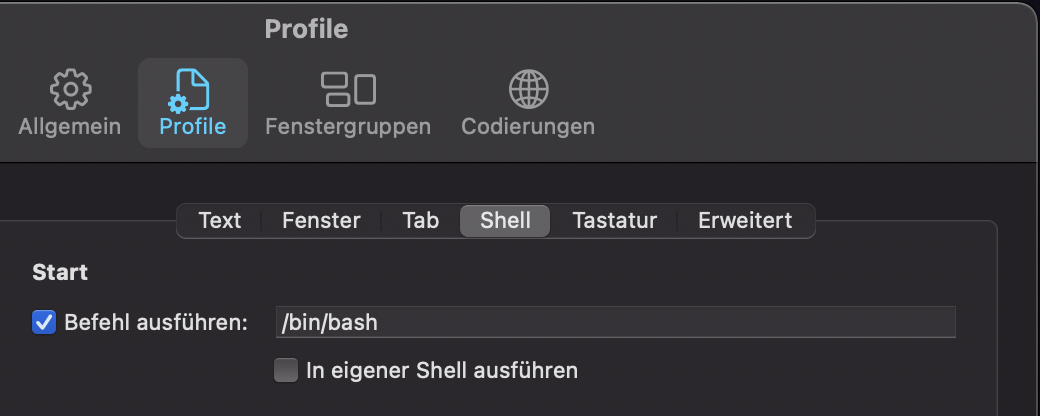
    What did finally work though was changing my login shell to /bin/bash instead of the default zsh for the time being:

    item-settings

    Maybe that helps someone.

    The “install the M1 version” process described by Noah Peters (thanks, really!) did work on the first try.

  • GitLab, App Service & CI/CD – Variant 1

    [Updates]

    • 2020-11-29 – reference terraform simple-appservice module
    • 2020-11-29 – add small fix for GitLab CI script

    Since I spent way more time fighting with this I though I might write a proper recap and maybe help others to get started. I also set up a repository with example code which should (!) be a “pull-and-run” thing once you have your ARM_ACCESS_KEY ready, which goes along with this blog post.

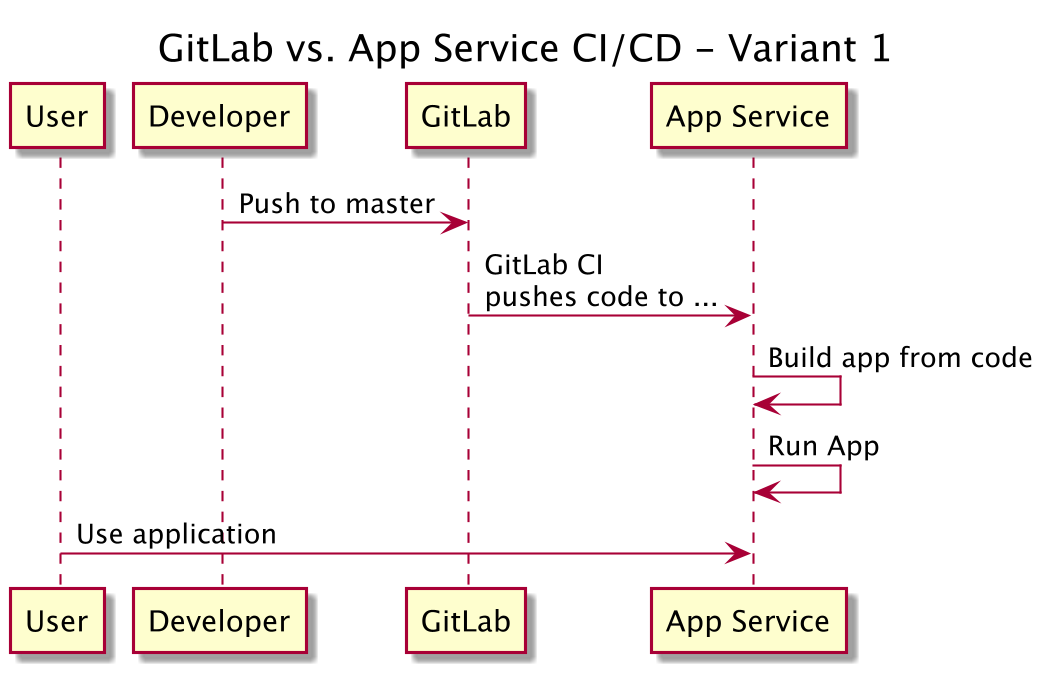
    Now, let’s get started. What we want to do here is basically pretty simple, and detailed in the picture below:

    git flow variant 1

    This sounds easy, right? It is, if you are done fighting Azure stupidity and know a couple of things. So what we need to do for this? We need to …

    • Create the App Service (I use terraform for this, and you can use my example repo or my terraform simple-appservice module to get started)
    • Create a GitLab repo (of course, that’s what this is all about, right? An example “hello world” flask up can also be found in the mentioned repo)
    • Configure the GitLab CI system to contain some credentials for the App Service
    • Add a .gitlab-ci.yml file to your GitLab repo to enable CI
    • … done.

    That should be exactly all. Let’s get started.

    Create the app service

    As said – please use my example repo and terraform. That should be enough:

    • make init
    • make plan
    • make do

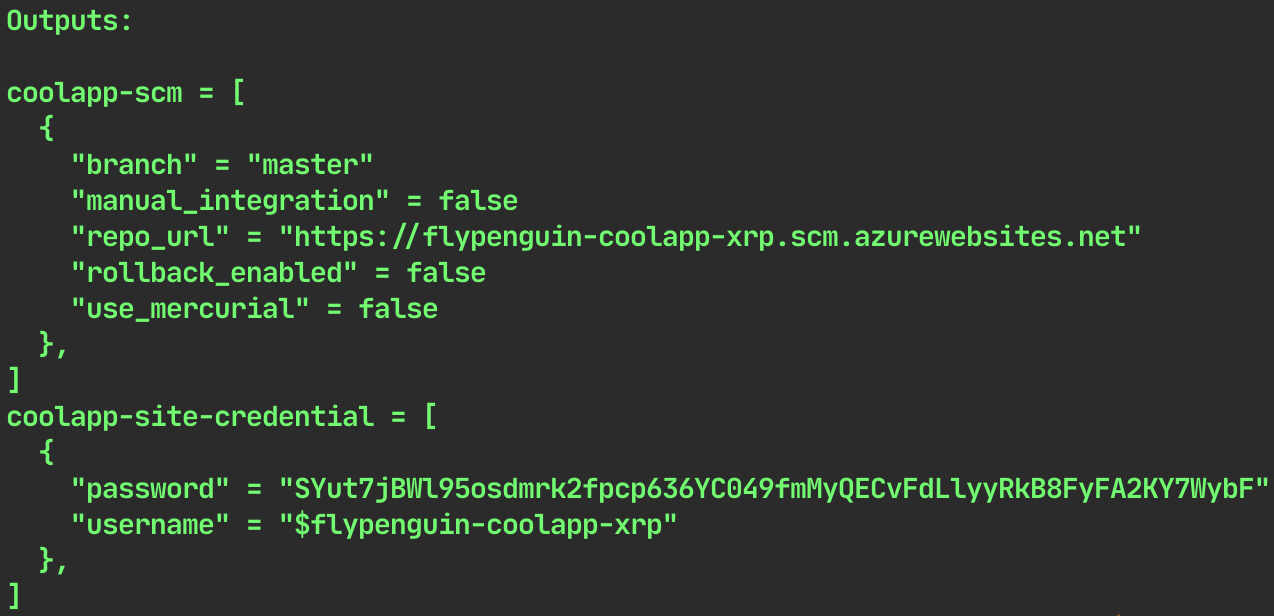
    Terraform should just output the needed credentials.

    terraform credential output

    Important to know:

    • use at least “B1 | Basic” for your SKU settings
    • your “source_control” setting should be “LocalGit” I guess. There is an error in either Terraform or Azure (I think the latter) if you use “ExternalGit”, which would be “variant 2” (a blog post to follow)

    Create a GitLab repo

    This one should do, and if you are rightfully annoyed by Azure give Render a try, they look cool (just found them about 2 mintes ago). To fork the repo you have to click the very unobtrusive “fork” button in the top right.

    Configure GitLab CI

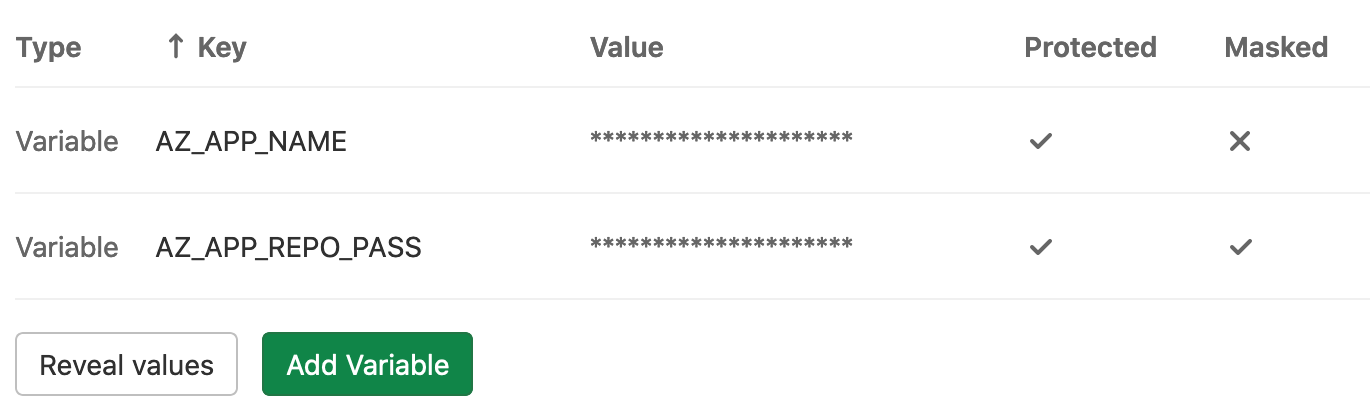
    The only thing to do is set two environment variables for the test runner. The information you need can be found either from my terraform output, or fom the Azure portal (images below). Then you add two variables in GitLab CI (GitLab repo -> settings -> CI/CD -> Variables):

    • AZ_APP_NAME (in this case this would be “flypenguin-coolapp-xrp”)
    • AP_APP_REPO_PASS (in this case this would be “SYut….”)

    set gitlab variables

    There are again a few caveats:

    • Basically the whole thing is based on the app name. Your user name should be your app name prefixed by a “$” sign, which is highly annoying.
    • If you ever want to use a “$” sign in any GitLab runner environment variable, you have to escape it with another “$”. Example: “my$variable” should be “my**$$**variable” in the “value” field of GitLab.

    Add .gitlab-ci.yml file to repo

    Well, just add the file and push the repo.

    stages:
      - push_to_azure
    push_it:
      stage: push_to_azure
      only:
        - master
      allow_failure: false
      before_script:
        - git config --global user.email "some@email.address"
        - git config --global user.name "GitLab CI Pipeline"
      script:
        - export REPO_FQDN="$AZ_APP_NAME.scm.azurewebsites.net"
        - export REPO_URL="https://\$$AZ_APP_NAME:$AZ_APP_REPO_PASS@$REPO_FQDN/$AZ_APP_NAME.git"
        - git remote add azure_app_service "$REPO_URL"
        - git remote -v
        # DEEP DIVE INFORMATION, DELETE ME IF YOU WANT
        # the local branch is 'detached head' - which is fucked.
        # we can't do "git push --force azure HEAD:master" on the FIRST push.
        # we can't push into an empty repository at all, even when using
        #   git push --force azure HEAD:refs/heads/master
        # because on the first push this will still not work.
        # the actually easiest way seems to be to not do "detached head" here.
        # so let's try to "unshallow" that thing.
        # https://is.gd/t7y7LM / https://is.gd/8YE4Ua
        # https://is.gd/rZDwxy / https://is.gd/rZDwxy
        - git fetch --unshallow origin || true
        - git push --force azure_app_service HEAD:refs/heads/master
    

    Finally – test.

    Just push a change to your repo and see if it works. The first obvious change is the addition of the .gitlab-ci.yml file … .

    Hope that helped, hope it works 🙂

  • Azure App Service & Python, Part II

    God I hate Microsoft.

    TL;DR – use “Basic” and “B1” as your app service SKUs. Anything “below” won’t work and you won’t know why.

    So, why I am again angry? Cause I want to deploy an app service, using terraform. Sounds soooooooooo simple, right? Except I fail at the creation of the app service (even without code, yet).

    Example:

    resource "azurerm_app_service_plan" "plan" {
      name                = "pkd-appservices0"
      location            = azurerm_resource_group.rg.location
      resource_group_name = azurerm_resource_group.rg.name
      kind                = "Linux"
      reserved            = true
    
      sku {
        tier = "Dynamic"     # WRONG, use at least "Basic"
        size = "Y1"          # WRONG, use at least "B1"
      }
    }
    
    resource "azurerm_app_service" "appservice" {
      name                = random_string.server.result
      location            = azurerm_resource_group.rg.location
      resource_group_name = azurerm_resource_group.rg.name
      app_service_plan_id = azurerm_app_service_plan.plan.id
    
      site_config {
        scm_type         = "LocalGit"
        linux_fx_version = "PYTHON|3.8"
      }
    }
    

    Now. What happens? Let’s see:

    Error creating App Service "wzkytawt" (Resource Group "pkd-it-appservices0"):
       web.AppsClient#CreateOrUpdate: Failure sending request: StatusCode=0 --
       Original Error: autorest/azure: Service returned an error. Status=<nil> <nil>
    

    What? Okay, our app service fails without any indication. By setting “TF_LOG=TRACE” and reading through 100s of lines of code we get this:

    Consumption pricing tier cannot be used for regular web apps
    

    What the fuck is a “consumption pricing tier”? Well, turns out MS doesn’t know as well, at least it’s described exactly nowhere. Also, can you get a list of tiers? No! Of course not! Why would you?  Stackoverflow to the rescue, again, btw, and no idea where that guy pulled that priceless list from.

    So, set things to “F1 | Free” and everything works.

    … or not. Now we get this:

    There was a conflict.                                              (really?!)
    
    64 Bit worker processes cannot be used for the site as the plan
    does not allow it.                                                 (WTF?)
    
    For more information on pricing and features, please see:
    https://aka.ms/appservicepricingdetails                            (oh! a link! NICE)
    

    Formatting and comments by me … . Now, wondering why the fuck a multi-billion-dollar corp can do less than my Raspi (run 64bit code) I head over to said page. And find nothing. There is not a single mention about 64bit, 32bit, or anything helpful. Just … prices.

    Assuming the fuckers just want more money I upgrade SKU to “B1 | Basic”, and everything works. (Update: I just saw that this is actually mentioned in the terraform docs 🙂

    This time for real, and I think I might be onto the path of finally understanding everything Microsoft does.
  • Azure App Service & Python, Part I

    A.k.a. “you’ve got to be fucking kidding me”. Azure App Service sucks, as basically any part of Azure. What’s surprising this time is that terraform actually contributes to the sucking on this occasion – usually the Hashi folks do a very good job at reducing the annoyance. But maybe they’ve given up, I wouldn’t blame them.

    So what happened?

    What confused the sh*t out of me the last days is that I see tutorials (all really, really, really bad) that do use Python versions newer than 3.4 (not surprisingly). But, alas, there’s this: the site_config.python_version field of terraform’s azurerm_app_service resource. It allows the values “2.7” and “3.4” (a Python version which eol’ed in March ’19).

    After a shit ton of googling I found this, though. Turns out, it’s not even the right field to use!! To select the Python runtime you should use linux_fx_version, which nobody, nowhere, ever documented. And naive me just assumed that something with “python” in its name would be the right thing to use. Stupid, I know, we’re talking Azure here …

  • Install flutter on MacOS

    I blog so I don’t forget … this:

    First, the non-CLI actions:

    • install XCode from the App Store
    • install Flutter plugin for Visual Studio Code (if you haven’t installed VS Code, do it now, you can also use “brew” for that)
    • download the latest Flutter SDK, unzip it, and move the unzipped flutter/ folder to $HOME/Dev/frameworks (or any other location you favor)
    • add $HOME/Dev/flutter/bin and $HOME/Dev/flutter/bin/.pub-cache/bin to your path

    That’s about it for now. Then do some CLI magic:

    brew tap dart-lang/dart
    brew install dart android-studio android-sdk
    sudo gem install cocoapods
    pod setup
    sudo xcode-select --switch /Applications/Xcode.app/Contents/Developer
    sudo xcodebuild -runFirstLaunch
    flutter doctor --android-licenses
    

    After that some more UI stuff:

    • Start Android Studio. It will want to install a couple of things (Intel drivers pop up, weirdly)

    And finally: A final flutter doctor will tell you if everything is all right.

    The whole process will download about 10-12 GB of data.

  • Bluetooth Headsets

    I’ve had a few now. Still do. Here’s a review.

    Bose QuietComfort QC 35 II

    The best one, hands down. I still try to move away. Why? Several reasons.

    • Bluetooth Connectivity. I had situations where I could barely move 2m away from the laptop until people started complaining. Line-of-sight, that is. Not 2m of concrete wall or something stupid.
    • I had 3 replacements in 2 years of usage, because the connectivity got worse over time.
    • ANC works perfectly – for me. If I fill my coffee maker in my kitchen is next to my home office workplace people hear the Niagra Falls.

    The good parts:

    • ANC. Just fucking awesome.
    • Super comfy earpads.

    Bose 700

    I assume the ANC is just as good. Those are the reasons I brought them back after 3 days:

    • Same Bluetooth issues.
    • They changed the headphone design, which is just annoying. The size adjustment is continuous, which to me is a big step back because the one from the QC worked flawlessly.
    • The touch controls suck – if you use them the earframe basically acts as a drum and produces very annoying and loud sounds from your fingers.
    • Same issues with surrounding noise in calls as well – it’s good for me, but not for my communication partners.

    Sennheiser Momentum 3 Wireless

    Ugh. I am disappointed. Solidly more expensive than the Boses, and a lot of disadvantages (firmware version 3.5.1):

    • Very base-heavy sound. You have to like that. The punch is cool, but can be annoying. Overall sound is great, though.
    • Heavy!! 304g, which is about 55g heavier than Bose 700, and you feel it. It really makes a difference!!
    • Uncomfortable. The grip is very, very strong and it hurts your head. I solved that by bending up the metal arc which forms the headphone. Also the earpads are much less soft than the Bose ones, which is also uncomfortable after a short while.
    • Bluetooth connectivity is good, but Bluetooth in general is awful. After taking a call I have to restart Spotify because it just won’t play any more. Connecting can also take a long time, sometimes. Also sometimes it’s “connected”, but sound is not played back from the device, and then the connection drops again.
    • It’s “Phone 1 connected”, “Phone 2 connected”, etc. where Bose actually reads the names of your devices so you know precisely which device you’re connected to.
    • The app is just awful.
    • Firmware updates take ages (about 15-20 minutes), and the app needs at least one restart and maybe a re-pairing to pick up the change.
    • No on/off button. You switch them off by folding them (if they accidentally unfold the battery will drain), and if you want to use them as passive headphones you have to unfold them while holding the control button. Very intuitive.
    • The ANC is just not good.
    • The head size adjustment is also continuous, basicalls the over-ear-part is sliding in a metal rail, which makes them always feel slightly wrong-fitted, especially if you reduced the grip-pressure before.
    • And the aforementioned issue with the noise for the other parties in the call.

    Jabra Elite 65t

    Jabra is starting to make a lot of things right. The only issues I have are:

    • My ears are tiny. The things are a bit big and uncomfortable (those are in-ear headphones).
    • And of course the issue with the ambient noise and the communication partners.

    The good points?

    • OK ANC.

    Apple AirPods Pro

    An incredible piece of hardware, absolutely stunning. Yet:

    • Comparatively short battery time (yes, this can be an issue in long and subsequent calls).
    • I quote: “Oh I can always tell if you use your AirPods – all the ambient noise is getting so much louder then“. (I kid you not)
    • If you want to hold them while talking on speaker, you have to be very careful. If just one of them thinks it’s “in your ear” because you block one of the “ear sensors” they will grab the call. Yes this is intended behavior, still I have found this annoying at enough occasions to remember.

    The good points?

    • Amazing sound for that size.
    • Amazing ANC for that size.

    Compared to the over-ears they lose of course. That is to be expected, or I would assume an even heavier price tag.

    Now what?

    I have isolated the Jabra Evolve2 85 to try. Why?

    • Made for conferencing – it has a hardware microphone in front of your mouth. It seems tech still needs this. Also if you pull it up you go mute, which is perfect.
    • Bluetooth.
    • I wanted a mic, and so I read up on gaming headsets. Unfortunately all of them are extremely specialized for gaming, so most come with additional hardware (e.g. a dongle) and use separate connections (Bluetooth vs. custom 2.4GHz dongle) for sound vs. speech. Also they are sometimes tied to a single hardware platform, so the risk of buying an expensive good one to use on the iPhone is substantial.
    • Apparently a whole apparatus of 11 (!) microphones for speech vs. noise computation.
    • Supposedly very good sound quality.
    • ANC is supposed to be good.
    • They come in beige, enough with boring black tech gear. (all right this is by no means a technical feature …)

    If those suck as well … I’m currently out of options.

  • Rancher 2.4+ installation notes

    I really like Rancher. Used in v1.x, now I’m back at a point where I might need it. Also I want to pitch it to my colleagues, which means I need to have a quick and dirty setup to fool around with. The Rancher Terraform (love it) modules are huge, and I wanted to have a simpler method (which I understand more) for my first training session with the guys.

    These are my notes: