Category: Snippets

  • Quick puppet debugging snippet for Atom

    Not sure how I could have lived without this Atom snippet expansion until now (had it before in Sublime, never bothered porting, stooooopid as I realize now 😉 ):

    '.source.puppet':
      'Puppet: fail inline template':
        'prefix': 'fit'
        'body': """
          $fail_me = inline_template('<%= require "yaml"; YAML.dump(@$1) %>')
          fail("\\\\n\\\\nVariable \\\\$$1:\\\\n\${fail_me}\\\\n\\\\n")
        """
    
  • Testing logstash configs with Docker

    Now this is really not rocket science, but since I might do this more often, I don’t want to google every time.

    Prepare your directories

    ./tmp                   # THIS IS YOUR WORKING DIRECTORY
      |- patterns/          # optional
      |   |- patternfile1   # optional
      |   |- patternfile2   # optional
      |- logs.log
      |- logstash.conf
    

    Prepare your logstash config

    # logstash.conf
    input {
      file {
        path => '/stash/logs.log'
      }
    }
    
    filter {
      # whatever config you want to test
      grok {
        match        => [ "message", "%{WHATEVER}" ]
        patterns_dir => '/stash/patterns'              # optional :)
      }
    }
    
    output {
      stdout { codec => rubydebug }
    }
    

    Run logstash

    docker run --rm -ti -v $(pwd):/stash logstash logstash -f /stash/logstash.conf
    

    Done.

    Done. 🙂

  • Loathing RSpec and Puppet

    There are words for how much I hate RSpec (especially RSpec-Puppet), but they would be too harsh to write down.

    So now that I don’t have to google the same shit over and over again, here’s what you have to do to get basic puppet module testing up and running (replace $MODULE with your module name, of course):

    $MODULE/Rakefile

    require 'rubygems'
    require 'puppetlabs_spec_helper/rake_tasks'
    

    $MODULE/.fixtures.yml

    fixtures:
      repositories:
        concat:
      git://github.com/puppetlabs/puppetlabs-concat.git
      # alternate method, for specifying refs
        stdlib:
      repo: git://github.com/puppetlabs/puppetlabs-stdlib.git
      ref: 1.0.0
      symlinks:
      # do _not_ forget this
        $MODULE: "#{source_dir}"
    

    $MODULE/spec/spec_helper.rb

    require 'rubygems'
    require 'puppetlabs_spec_helper/module_spec_helper'
    

    $MODULE/spec/classes/$MODULE_spec.rb

    # see also http://rspec-puppet.com/
    require 'spec_helper'
    
    describe '$MODULE' do
      context 'default' do
        it {
          should contain_file('/etc/haproxy/haproxy.conf')
        }
    
        # or ...
        it do
          is_expected.to contain_file('/this/syntax/is/even/more/retarded')
        end
      end
    end
    

    Final note

    It’s “rake spec”, not “rake test”. Of course.

  • TeamCity LDAP authentication with JumpCloud

    JumpCloud looks like a great service to use LDAP without using LDAP. And I have just managed to find an error in the documentation, precisely the file “ldap-config.properties.dist”.

    The working configuration is:

    # basic jumpcloud url
    java.naming.provider.url=ldap://ldap.jumpcloud.com:389/
    
    # search user for jumpcloud
    java.naming.security.principal=uid=BIND_USER_NAME,ou=Users,o=ORG_ID,dc=jumpcloud,dc=com
    java.naming.security.credentials=BIND_USER_PASSWORD
    
    # unix ldap seems to use uid as username - see https://is.gd/dBPegr
    teamcity.users.login.filter=(uid=$capturedLogin$)
    teamcity.users.username=uid
    teamcity.users.base=ou=Users,o=ORG_ID,dc=jumpcloud,dc=com
    

    Seems to work nicely, now comes the finetuning.

  • Migrate Rancher database from container to external

    I wanted to switch from an in-container database setup to an external database setup. And I didn’t know what happens when you just lose all database contents, and I thought with Docker and some tweaking that should also not be necessary. So I just migrated the databases. Here’s what I did for those interested:

    • stop rancher
    • use a container (sameersbn/mysql) to mount the rancher database content and do a mysqldump
    • import the dump into the external database (AWS RDS instance)
    • start rancher up with different parameters (use external database, as described in the official docs)

    And now the actual command lines:

    # create socket directory
    $ cd RANCHER_MYSQL_MOUNT
    $ mkdir sockets
    
    # start sameersbn/mysql to have a mysql container for dumping everything
    $ docker run -d --name temp-mysql -v $(pwd)/sockets:/var/run/mysqld -v $(pwd):/var/lib/mysql sameersbn/mysql
    
    # dump the database
    $ mysqldump -S ./sockets/mysqld.sock --add-drop-database --add-drop-table --add-drop-trigger --routines --triggers cattle > cattle.sql
    
    # restore the database in AWS / whatever
    $ mysql -u USERNAME -p -h DB_HOST DB_NAME < cattle.sq
    

    (Don’t forget to stop the sammersbn container once you’re done). I have configured puppet to start rancher. The final configuration in puppet looks like this:

    ::docker::run { 'rancher-master':
      image   => 'rancher/server',
      ports   => "${rancher_port}:8080",
      volumes => [],
      env     =>  [
        "CATTLE_DB_CATTLE_MYSQL_HOST=${db_host}",
        "CATTLE_DB_CATTLE_MYSQL_NAME=${db_name}",
        "CATTLE_DB_CATTLE_MYSQL_PORT=${db_port}",
        "CATTLE_DB_CATTLE_MYSQL_USERNAME=${db_user}",
        "CATTLE_DB_CATTLE_MYSQL_PASSWORD=${db_pass}",
      ],
    }
    

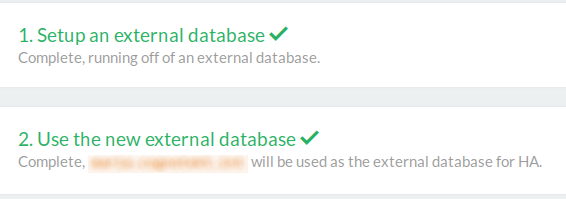
    Restart, and it seems to be working just fine. To check go to http://RANCHER_URL/admin/ha (yes, we still use HTTP internally, it will change), and you should see this:

    setup screen

    Nice.

  • Ansible inventory file from Consul

    Quick self-reminder:

    curl consul.domain:8500/v1/catalog/nodes | jq '.[]|.Address' | tr -d '"'
    
  • Host monitoring with Prometheus

    I needed monitoring. The plan was to go for an external service – if our environment breaks down, the monitoring is still functional (at least as far as the remaining environment goes). I started to evaluate sysdig cloud, which comes somewhat recommended from “the internet”.

    But then I was kinda unsatisfied (to be honest – most probably unjustified) with the service, because I really didn’t like the UI, and then one metric which was displayed was just wrong. So I got back to prometheus, which we use for metrics gathering of our running services anyway, and used it for host metric monitoring, too.

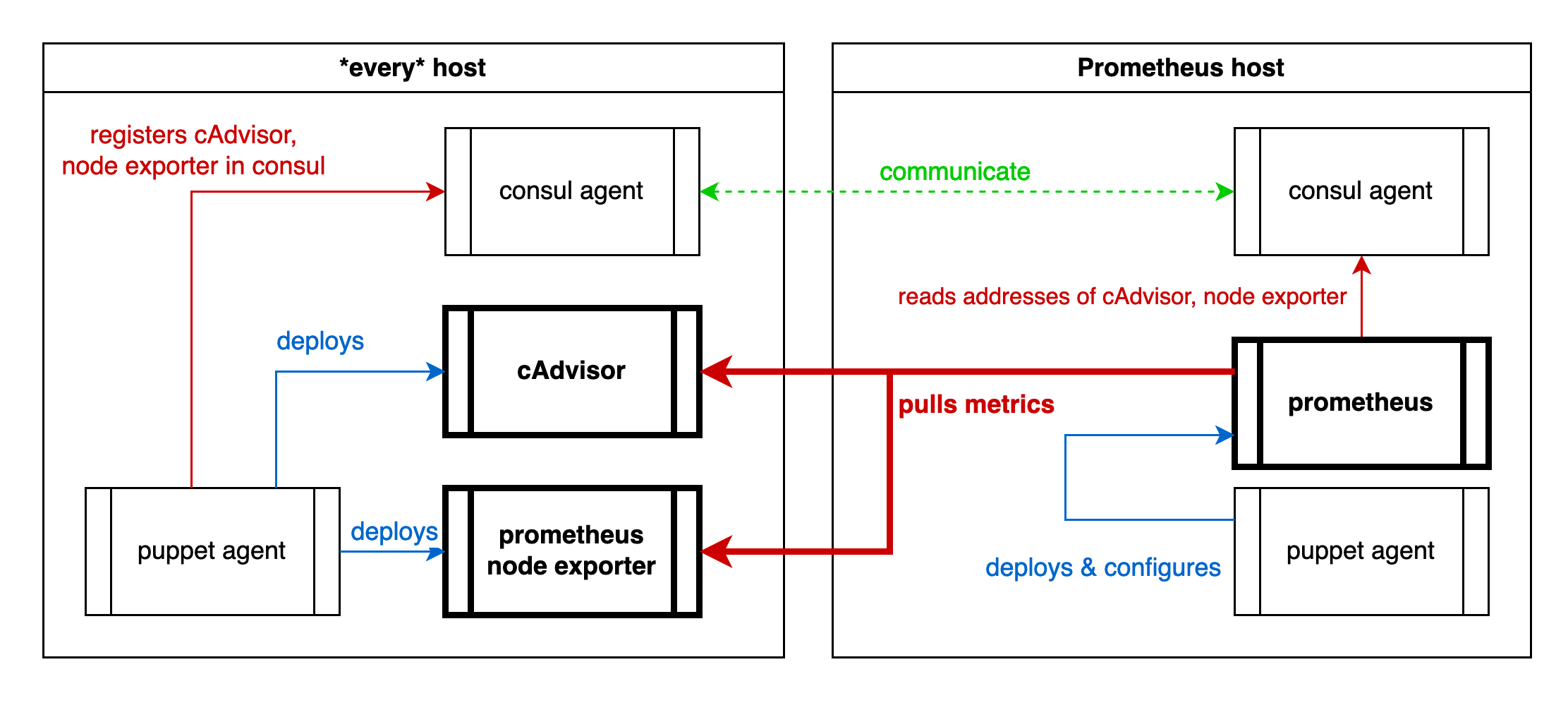
    That’s my setup. (sorry for the crappy graphic, WordPress does not support SVG … ?!?)

    monitoring setup diagram

    Cause I have consul running on every host, puppet deploying everything, I can use puppet to register the exporter services to consul, and consul to configure prometheus, which has native consul support.

    The prometheus configuration to pull all this is pretty simple actually, once it works:

    global:
      scrape_interval: 10s
      scrape_timeout: 3s
      evaluation_interval: 10s
    scrape_configs:
      - job_name: consul
        consul_sd_configs:
          - server: consul.internal.net:8500
            services: [prom-pushgateway, cadvisor, node-exporter]
        relabel_configs:
          - source_labels: ["__meta_consul_node"]
            regex: "^(.*)$"
            target_label: node
            replacement: "$1"
          - source_labels: ["__meta_consul_service"]
            regex: "^(.*)$"
            target_label: job
            replacement: "$1"
        metric_relabel_configs:
          - source_labels: ["id"]
            regex: "/([^/]+)/.*"
            target_label: item_type
            replacement: "$1"
          - source_labels: ["id"]
            regex: "/[^/]+/(.*)"
            target_label: item
            replacement: "$1"
          - source_labels: ["id"]
            regex: "/docker/(.{8}).*"
            target_label: item
            replacement: "$1"
    

    Some caveats:

    • Prometheus will not tell you why a relabeling does not work. It will just not do it.
    • Prometheus will not tell you that a regex is faulty on SIGHUP, only on restart.
    • The difference between “metric_relabel_configs” and “relabel_configs” seems to be that the former must be applied to scraped metrics, while the latter can only be applied to metrics which are “already present”, which seems to be only the “\__*”-meta labels (for example “__meta_consul_service”)

    Then it works like a charm.

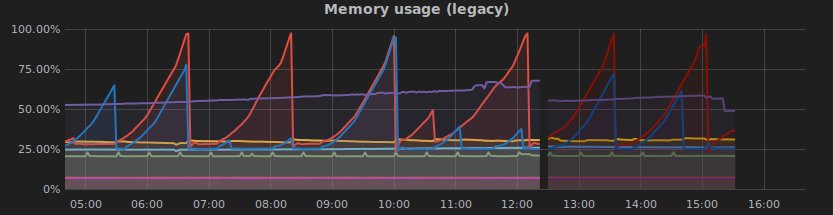
    And the final bonbon: Directly after I had it running I discovered a problem:

    grafana shows a problem

    Yippieh 😀

    consul, #monitoring, #prometheus, #puppet

  • CI/CD, the status quo

    … is quickly summed up: Working. 🙂

    So I am – naturally – a happy camper. Although, there are a couple of things I would like to change, which don’t scale or are in a state I’m not happy with for “v1.0” yet.

    Container data persistency

    Rancher does offer convoy, but I’m not sure it really fits my needs, and even if I’m not using it yet. And it starts to hurt not to have this. Badly. (AWS Elastic File System would be excactly what I need, but that’s not going to happen I fear). And even this is the most hurting part, not sure if this is the one I can solve quickest.

    Pressure: 9

    Monitoring.

    It’s embarassing, but – I don’t have host monitoring. I don’t even remember how often I needed to re-create a host cause the disk went full without me noticing (and recreation is just so much easier than fixing, actually, so at least this is a good sign). The current evaluation candiate is sysdig cloud. That might change to DataDog. And don’t get me started on log management.

    Pressure: 8,5

    TeamCity.

    While I like TeamCity, it’s – like all things Java – horribly, completely, fully over-engineered mess with billions of functions which all don’t quite do what you want. In our case it’s also reduced to executing basically 3 scripts. So TeamCity must go, mid term. Replacement? No idea. Gradle, drone.io, wercker, distelli or Travis seem viable candidates. (Also found an interesting article about online CI tools which is well worth a read).

    Pressure: 7

    Intmaniac.

    It’s written by me. And it sucks, and, although it works, it must go.

    Pressure: 7

    Security.

    Currently I am focused on “getting things to usable”. Security is not on that list. I need to address some of the issues which I ignored until now, mainly because they might have architecture impact. (Which I believe I planned pretty well, but who knows until you have to actually do it, right?)

    Pressure: 6

    Puppet.

    I am still using Puppet. Might be overkill, but it’s reliable once set up. That brings me to … the set up. I am still using masterless puppet, one environment, and pulling the repo from each host each time. Simple, robust, working, but not elegant. I see different environments coming up, and then … hm. It’s gonna be complicated.

    Pressure: 6

    Rancher.

    Rancher is awesome. But I’m so desperately waiting for this feature right here to arrive it’s not funny any more 🙂 . I also need the same thing for host-based services (which are not inside of a container orchestration platform). I want to spawn a service somewhere, and an Amazon Route53 entry should appear automatically. Preferably based on a consul readout. So DNS management becomes a non-issue.

    Pressure: 5

    HA.

    If one host breaks, the whole cloud is inoperable. Which one? The NAT host. Needed for any host to get a connection to the outside in AWS. And that’s just one breaking point of a couple. Critical? Not really. Super annoying? You bet.

    Pressure: 4

    Cloudformation.

    Currently I use cloudformation to set everything up. And although it’s an awesome product, it’s kinda limited. If a host is gone, I can’t call “cloudformation fix-it” and this very host will respawn. With tools like terraform this is possible, but terraform relies (or relied the last time I looked) on local state data, which is a big pffft. It also means to really test an updated cloudformation template I have to recreate the full thing, which is just too cumbersome. (Takes about 1 hour to completely migrate everything, if done quickly, which is awesome for a complete outage, but really bad for testing). But maybe I just don’t know enough and my template is way too tightly written.

    Pressure: 3
  • Arch with dm-cryptt on UEFI boot

    Just a collection of links, cause this is something which is not really documented in full. I am also too lazy, but next time I don’t want to search 🙂 .

    • Basic installation instructions: 3rd party article (German), Arch Linux docs (without LUKS)
      • Read the comments on the first article: gummiboot is now bootctl, you have to format the boot partition with FAT32, and you should use a better random generator on cryptsetup. It’s all in there.
      • Note: The former /boot partition is identical to the UEFI boot partition. You don’t need both.
    • Arch Linux original instructions: In German, in English
      • Careful: The setting “FONT_MAP” in /etc/vconsole.conf in the German guide should not be applied! It’s obsolete.
      • The English guide does only go into the crypt installation, but that really deep.
    • If you actually added FONT_MAP to /etc/vconsole.conf, that happens
    • The file /vmlinuz-linux comes in the “kernel” package. If it’s missing, just reinstall “pacman -S kernel”
    • You can usually choose between NetworkManager and systemd-networkd as networking management solutions. I chose NetworkManager:
      • systemctl enable NetworkManager
      • systemctl start NetworkManager
      • systemctl disable systemd-networkd
      • systemctl disable systemd-resolved
    • Installing GNOME (and the login manager gdm) is pretty simple:
      • pacman -S gnome gnome-extras
      • systemctl enable gdm

    That should be it.

  • Really annoying thread properties

    This sucks monkey ass, mainly because I didn’t think of that before. And that’s just one example why multi-threaded (soon to be -processing, probably) applications are hard.

    import subprocess as sp
    import time
    import os
    from threading import Thread
    
    
    class MyThread(Thread):
    
        def __init__(self, mydir):
            super().__init__()
            self.mydir = mydir
    
        def run(self):
            os.chdir(self.mydir)
            time.sleep(2)
            print("I'm (%s) in directory %s"
                  % (str(self), os.getcwd()))
    
    if __name__ == "__main__":
        MyThread("/tmp").start()
        time.sleep(1)
        MyThread("/").start()
    

    Result is:

    I'm (<MyThread(Thread-1, started 140195858716416)>) in directory /
    I'm (<MyThread(Thread-2, started 140195850323712)>) in directory /