Category: Snippets

  • Powershell Script Base

    Easy powershell function template:

    # VERY USEFUL:
    # https://adamtheautomator.com/powershell-functions/
    
    function Personal-Function {
        [CmdletBinding()]
        param(
          [Parameter(Mandatory)]
          [string] $UserPrincipalID
        )
    
      Write-Host "Hey ho "$UserPrincipalID
    }
    

    Save as myfunction.ps1, execute like this:

    C:\Blabla> . ./myfunction.ps1
    C:\Blabla> Personal-Function my-principal-id
    Hey ho my-principal-id
    C:\Blabla> _
    

    Note: Load with . .\myfunction.ps1 (note the two dots at the start) because you don’t want to execute the file in a sub-process, you want to load the file in this process.

    • if you load it using .\myfunction.ps1 (which will “work”), a new sub-shell is spawned, which loads the file, does nothing, and ends.
    • so the currently active shell does now know about the function, cause it was only ever evaluated in the sub-shell which already quit
    • same as with *nix (the source or . command)

    (PS: Powershell syntax highlighting should work, but doesn’t. Uncool.)

  • Install “legacy” brew on M1 apple silicon

    I tried installing homebrew for about 3 days following the completely identical howto postings out there (i.e. “prefix with ‘arch -x86_64′”). Alas, it didn’t work:

    $ arch -x86_64 /bin/bash -c "$(curl -fsSL https://raw.githubusercontent.com/Homebrew/install/master/install.sh)"
    Password:
    Homebrew is not (yet) supported on ARM processors!
    Rerun the Homebrew installer under Rosetta 2.
    If you really know what you are doing and are prepared for a very broken
    experience you can use another installation option for installing on ARM:
      https://docs.brew.sh/Installation
    

    The other recommendation (run the whole terminal under Rosetta2, scroll down to “Running a special flavor […]”) also did not work.

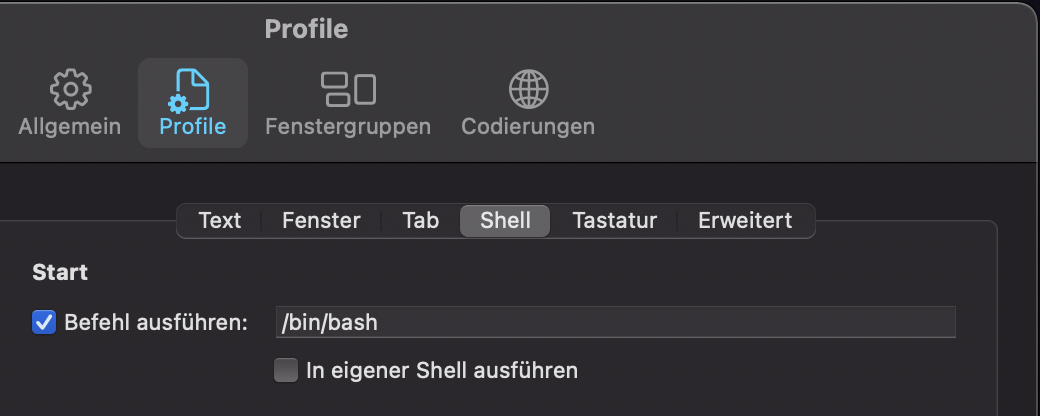
    What did finally work though was changing my login shell to /bin/bash instead of the default zsh for the time being:

    item-settings

    Maybe that helps someone.

    The “install the M1 version” process described by Noah Peters (thanks, really!) did work on the first try.

  • Azure App Service & Python, Part I

    A.k.a. “you’ve got to be fucking kidding me”. Azure App Service sucks, as basically any part of Azure. What’s surprising this time is that terraform actually contributes to the sucking on this occasion – usually the Hashi folks do a very good job at reducing the annoyance. But maybe they’ve given up, I wouldn’t blame them.

    So what happened?

    What confused the sh*t out of me the last days is that I see tutorials (all really, really, really bad) that do use Python versions newer than 3.4 (not surprisingly). But, alas, there’s this: the site_config.python_version field of terraform’s azurerm_app_service resource. It allows the values “2.7” and “3.4” (a Python version which eol’ed in March ’19).

    After a shit ton of googling I found this, though. Turns out, it’s not even the right field to use!! To select the Python runtime you should use linux_fx_version, which nobody, nowhere, ever documented. And naive me just assumed that something with “python” in its name would be the right thing to use. Stupid, I know, we’re talking Azure here …

  • Install flutter on MacOS

    I blog so I don’t forget … this:

    First, the non-CLI actions:

    • install XCode from the App Store
    • install Flutter plugin for Visual Studio Code (if you haven’t installed VS Code, do it now, you can also use “brew” for that)
    • download the latest Flutter SDK, unzip it, and move the unzipped flutter/ folder to $HOME/Dev/frameworks (or any other location you favor)
    • add $HOME/Dev/flutter/bin and $HOME/Dev/flutter/bin/.pub-cache/bin to your path

    That’s about it for now. Then do some CLI magic:

    brew tap dart-lang/dart
    brew install dart android-studio android-sdk
    sudo gem install cocoapods
    pod setup
    sudo xcode-select --switch /Applications/Xcode.app/Contents/Developer
    sudo xcodebuild -runFirstLaunch
    flutter doctor --android-licenses
    

    After that some more UI stuff:

    • Start Android Studio. It will want to install a couple of things (Intel drivers pop up, weirdly)

    And finally: A final flutter doctor will tell you if everything is all right.

    The whole process will download about 10-12 GB of data.

  • Rancher 2.4+ installation notes

    I really like Rancher. Used in v1.x, now I’m back at a point where I might need it. Also I want to pitch it to my colleagues, which means I need to have a quick and dirty setup to fool around with. The Rancher Terraform (love it) modules are huge, and I wanted to have a simpler method (which I understand more) for my first training session with the guys.

    These are my notes:

  • Homebrew, OpenSSL and PowerShell

    On Mac, PowerShell really, really wants to specifically use OpenSSL version 1.0.

    Unfortunately, homebrew switched to OpenSSL version 1.1 in v2.2, because OpenSSL 1.0 is end-of-life.

    This fixes it (for now at least):

    brew uninstall openssl --ignore-dependencies
    brew uninstall openssl --ignore-dependencies
    brew install https://github.com/tebelorg/Tump/releases/download/v1.0.0/openssl.rb
    

    … but breaks basically any SSL-using software. So decide for yourself, I stopped using this hack.

    References:

  • Ubuntu update procedure

    Brain dump.

    # from here: https://askubuntu.com/a/862799/870970
    apt-get update && apt-get --with-new-pkgs upgrade
    
    # restart
    reboot
    
    # do it again
    apt-get update && apt-get --with-new-pkgs upgrade
    
    # remove shit
    apt autoremove
    
    
    #
    # UPGRADE
    #
    
    do-release-upgrade
    
    
    # done.
    
  • Coding fonts

    This is a list of popular coding fonts. My personal favorites are marked in bold.

    As for “why” … Consolas and Menlo are just super smooth. Right weight / height / spacing / proportions. You can “just work” with them and it’s never wrong. At the moment I think JetBrains Mono is just this tiny bit better, even if only for the ligatures.

    Honorable mentions go to Iosevka, which is a bit strange, but very narrow so you can fit a lot in the available screen width.

    The rest is not bad, I just keep circling back to one of the mentioned alternatives within minutes usually. Personal style might differ.

    • Consolas – Windows proprietary.
    • Menlo – Mac proprietary.
    • Jetbrains Mono – brew cask: font-jetbrains-mono
    • Fira Code – brew cask: font-fira-code
    • Hack – brew cask: font-hack
    • Monoid – brew cask: font-monoid
    • Iosevka – brew cask: font-iosevka
    • Inconsolata – brew cask: font-inconsolata (broken?!)
    • Source Code Pro – brew cask: font-source-code-pro
  • nextcloud and Docker and reverse proxies

    I have a nextcloud setup like described here (docker-compose, let’s encrypt proxy companion, postgres and nextcloud). And for a while I couldn’t connect any new nextcloud clients to the installation.

    This fixed it:

    <?php
    $CONFIG = array (
      # manually added because it's not picked up from
      # the env vars once set ... it seems ...
    
      # the docker IP range
      'trusted_proxies' => ["172.16.0.0/12"],
    
      # the hostname of the server
      'overwritehost'   => "my.super.secret.server",
    
      # the ENDUSER->PROXY protocol, NOT the proxy-> nextcloud protocol!
      'overwriteprotocol' => "https",
    
      #
      # AAAND NOW back to the original config file ...
      # ...
    )
    

    Some notes:

  • FritzBox, Unify Security Gateway, and router replacements

    My respect for network changes went up two or three … hundred notches.

    What happened. At my mother’s place, there was a German FritzBox, which handles a VPN between my place and hers, phone lines, the doorbell, WiFi, DHCP, and maybe even more. Now we rent our parts of our house with AirBnB, and those people want – WiFi.

    I don’t want them to be in the same WiFi as myself and – more important – my mother, also I wanted to manage the whole house-WiFi from one central place. Unify / Ubiquity does a great job of delivering really capable products to a reasonable price, so I went for it. During the whole weekend (really, every waking second except for two 10k runs to get the anger out of my system) this is what I learned:

    • This article about how to configure a FritzBox to just do the modem part is still and fully correct for 1und1 in Germany.
    • FritzBox PPPoE passthrough might not work if the model is too old. It won’t tell you anything.
    • You don’t need to set a VLAN ID in the USG then.
    • You do not need to prefix the 1und1 username with “H”, at least for my contract.
    • You must not configure any duplicate IPs in the Unify Control Center, ever. The thing works declaratively – if you hit “apply” or “save” the Control Center tries to create this scenario.
    • What do I mean? I configured the local “network” in the USG with the existing router/gateway IP. But when hitting “save” the USG is immediately configured to use that IP, battling the FritzBox, and provisioning will fail.
    • A FritzBox cannot connect two site networks without the usage of the proprietary “MyFritz” service out of the box. You have to tinker. Which sucks. (Really, AVM?! No site2site VPNs without MyFritz?!)
    • This is the last open item btw, this is the only thing I couldn’t rebuild so far.
    • “systemd-resolved” really want to use DNSSEC. It shouldn’t when using a USG as name server though.
    • /etc/systemd/resolved.conf does not like comments after settings (“THING=value # with a comment behind” will not work)
    • cron jobs are “out”, using systemd timers is “in”.
    • a systemd timer has to be treated the same way as a systemd service (“systemctl enable thing.timer ; systemd start thing.timer“)
    • systemd really wants to do everything
    • … but I kinda like it, it’s one thinking behind everything, and really flexible
    • … if it works.
    • … which it sometimes really doesn’t
    • … and then you have no f*cking clue why.

    In the end, I’m about 90% there. The results are very, very good – Unifi does a great job in providing ready-for-use products which satisfy SMB requirements just fine. Some annoyances, well, really solid and flexible and insanely useful nonetheless.